> For the complete documentation index, see [llms.txt](https://blog.pepperclipp.com/pepperclipp-public/llms.txt). Markdown versions of documentation pages are available by appending `.md` to page URLs; this page is available as [Markdown](https://blog.pepperclipp.com/pepperclipp-public/gcp/ghost-in-the-script-impersonating-google-app-script-projects-for-stealthy-persistence.md).

# Ghost in the Script: Impersonating Google App Script projects for stealthy persistence

One of the most important steps in an infrastructure attack is persisting in the target’s environment. Persistence often needs to be established multiple times, depending on the level of access they gain. Security systems have become smart enough to detect many forms of persistence mechanisms. This has led attackers to continue to find new and creative ways to persist in a target’s environment.

Google Workspace Apps Script is a feature that allows any user with a Gmail account to automate business applications and enables the applications to interact with each other. Underneath, when an Apps Script app is deployed, a GCP Project is created on the GCP Organization the account is part of. Aside from the format of the Project ID, these projects are not very different from a normal GCP project. This means, an attacker can choose to use one of these projects to host resources and persist on the target. They can also create a GCP project with the same name format as an Apps Script project to impersonate a legitimate Apps Script Project and evade detection.

This blog will go through how Apps Script projects work and how an attacker can utilize the Apps Script projects to persist in a target’s environment. Then, we will look into how these techniques can be detected and prevented, so they will not be able to be maliciously utilized by attackers.

### The ins and outs of Apps Script <a href="#the-ins-and-outs-of-apps-script" id="the-ins-and-outs-of-apps-script"></a>

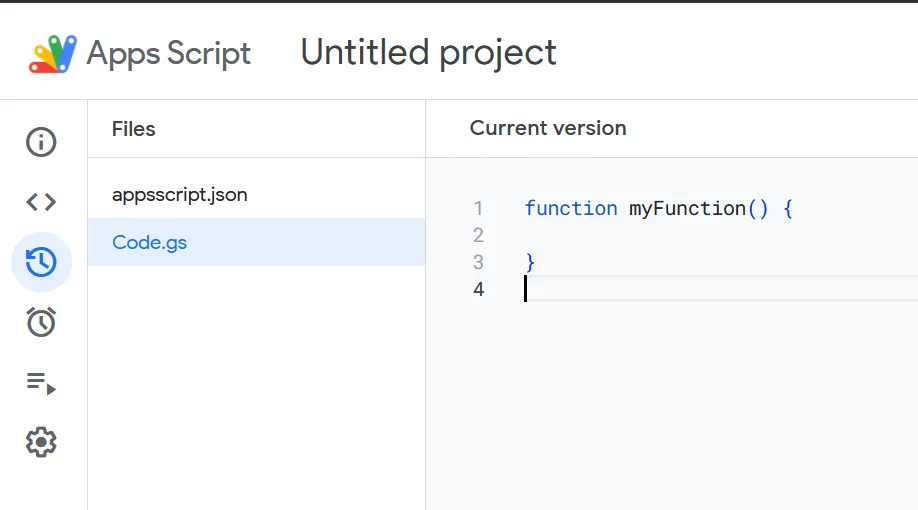
Google Workspace Apps Script, associated with the endpoint `script.google.com`, are a low code solution, allowing anyone with a Gmail account to automate business applications that integrate with Google Workspace. It offers a scripting interface using JavaScript to integrate Google services and build lightweight automations.

<figure><img src="https://cdn.prod.website-files.com/67e6900e4370de1b108ab81b/68bf2105541d2df19dfa73fa_a699c1a8.png" alt="Google Apps Script editor showing “myFunction” in Code.gs of an untitled project."><figcaption><p><em>Example Google Apps Script</em></p></figcaption></figure>

Apps Script is highly flexible. With it, you can:

* Create custom menus, dialogs, and sidebars in Google Docs, Sheets, and Forms
* Develop custom functions and macros for Google Sheets
* Publish web apps, either as standalone applications or embedded within Google Sites
* Connect with other Google services such as AdSense, Analytics, Calendar, Drive, Gmail, and Maps
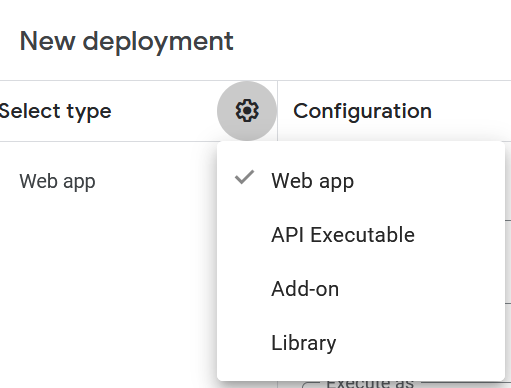
* Build lightweight add-ons and share them through the Google Workspace Marketplace<br>

<figure><img src="https://cdn.prod.website-files.com/67e6900e4370de1b108ab81b/68bf212cee77543445db014e_4b08ecbd.png" alt="New deployment settings in Google Apps Script with Web app selected from configuration menu."><figcaption><p><em>Apps Script types available</em></p></figcaption></figure>

When an App Script is created, a project with a prefix `sys-` is automatically created. These projects are not visible in the organization’s projects list on the console, which makes sense, since they are not considered Organization Projects.

<figure><img src="https://cdn.prod.website-files.com/67e6900e4370de1b108ab81b/68bf21385c6529db013bcc34_fb4abf6f.png" alt="Google Cloud Console “Select a resource” dialog showing Exaforce organization and project list."><figcaption><p><em>Project list without Apps Script projects</em></p></figcaption></figure>

‍

However, the projects are visible through the terminal tool (`gcloud`) by identities with access to execute `resourcemanager.projects.list`.

<figure><img src="https://cdn.prod.website-files.com/67e6900e4370de1b108ab81b/68bf21432f3c006424aab090_e0b91ef5.png" alt="Terminal showing gcloud projects list output with project IDs and names."><figcaption><p><em>gcloud projects list that does contain Apps Script projects</em></p></figcaption></figure>

When an App Script project is created, GCP will create a Resource Manager folder and subfolder by default in the organization, with the names `system-gsuite/apps-script`. Here again, there seem to be no projects inside these folders when viewed in the console.

<figure><img src="https://cdn.prod.website-files.com/67e6900e4370de1b108ab81b/68bf214e34b837cc4d62a202_c3e84229.png" alt="Google Cloud Console resources table showing Exaforce organization and projects."><figcaption><p><em>Console view of the Apps Script subfolder with no projects visible</em></p></figcaption></figure>

‍

Using the CLI, however, we see the App Script projects inside the `apps-script` subfolder. This is where the App Script projects reside after creation.

<figure><img src="https://cdn.prod.website-files.com/67e6900e4370de1b108ab81b/68bf2163cecfb0b31f8d74b0_0437525e.png" alt="Terminal filtering projects by folder ID using gcloud projects list --filter."><figcaption><p><em>CLI output with Apps Script projects in the system-gsuite/apps-script subfolder</em></p></figcaption></figure>

### Abusing Apps Script impersonation on a GCP Organization <a href="#abusing-apps-script-impersonation-on-a-gcp-organization" id="abusing-apps-script-impersonation-on-a-gcp-organization"></a>

#### Cryptomining Instance

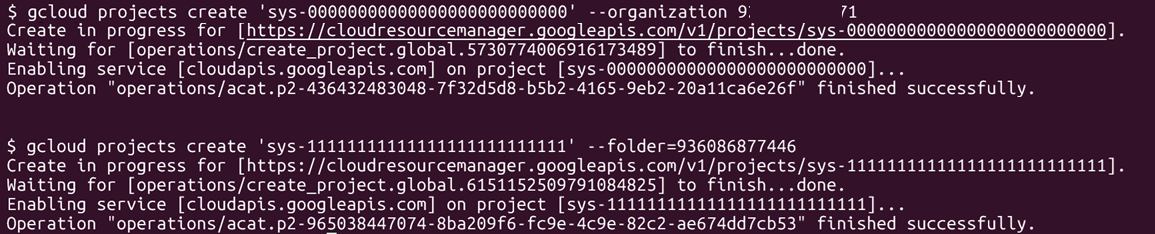
App Script projects follow an ID format of `sys-<26 numbers>`. In GCP, we can create a project and store it in any folder or subfolder we have access to and we can set the project name to anything as long as it contains ASCII letters, digits, and hyphens, and is between 6-30 characters. The combination of `sys-<26 numbers>` is exactly 30 characters long, containing numbers, letters, and a hyphen.

<figure><img src="https://cdn.prod.website-files.com/67e6900e4370de1b108ab81b/68bf21822050f5b2c4d64eef_2017eb5b.png" alt="Terminal output showing successful creation of new GCP projects using gcloud projects create."><figcaption><p><em>Creating a GCP project that looks like an Apps Script project</em></p></figcaption></figure>

One difference we found was how the projects looked based on the location where they were stored. If a project is stored at the organization level, the project, though having an ID format of `sys-<26 numbers>`, will show in the console (project `sys-00000000000000000000000000`). However, when created inside the `apps-script` folder, the app does not show as a project on the console (project `sys-11111111111111111111111111`).

<figure><img src="https://cdn.prod.website-files.com/67e6900e4370de1b108ab81b/68bf21822050f5b2c4d64ef2_d7be60f5.png" alt="Resources table in Google Cloud Console showing organization, projects, and folders."><figcaption><p><em>Console view of projects where sys-00000000000000000000000000 is shown due to being in the organization level, but sys-11111111111111111111111111 in the apps-script folder is not</em></p></figcaption></figure>

The projects are still listed when `resourcemanager.projects.list` is executed on the terminal.

<figure><img src="https://cdn.prod.website-files.com/67e6900e4370de1b108ab81b/68bf21a1cecfb0b31f8d86bb_b19aa488.png" alt="Terminal output listing GCP projects with IDs, names, and project numbers."><figcaption><p><em>gcloud CLI listing both projects</em></p></figcaption></figure>

An attacker with permissions to `resourcemanager.projects.create` can utilize the fact App Script projects do not show as other projects do to create a project in the target’s organization and store resources there. Each project can also have a name, which can be provided by the creator. An attacker can also look at other projects in the target’s organization to find a convincing name for the project.

<figure><img src="https://cdn.prod.website-files.com/67e6900e4370de1b108ab81b/68bf21ac2fccbe8916e92208_00f05f44.png" alt="gcloud command creating a new project named ‘Exaforce Google Sheet Function’."><figcaption><p><em>gcloud CLI used to create a hidden project</em></p></figcaption></figure>

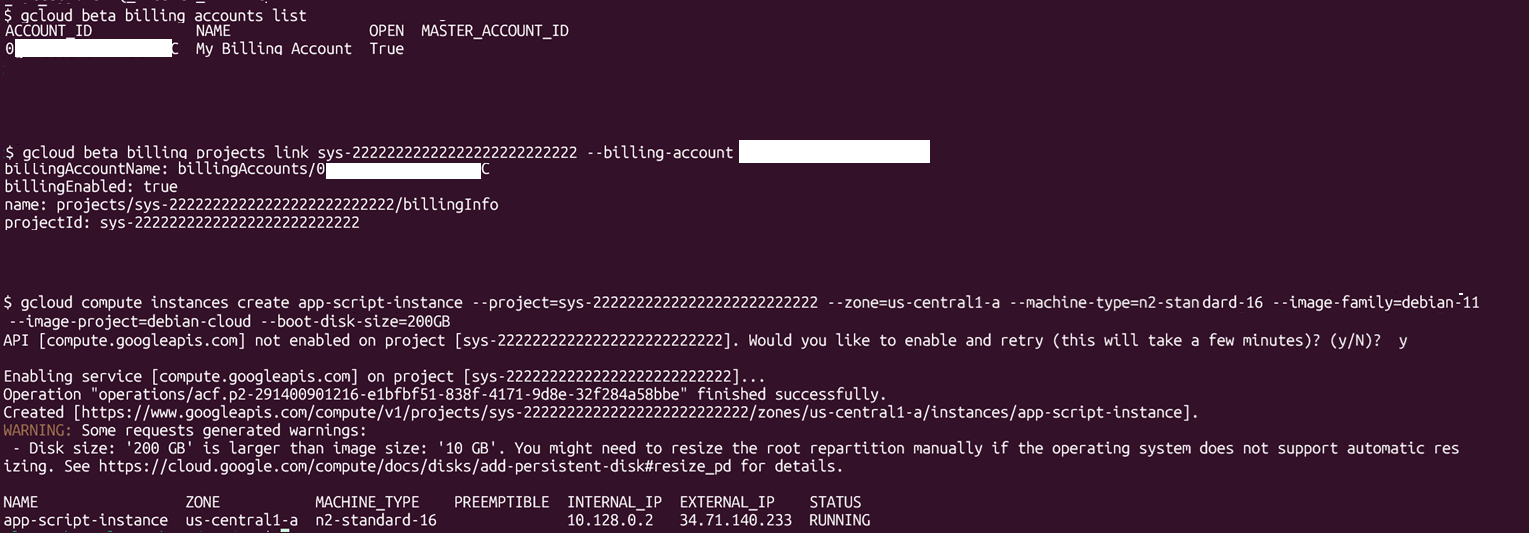
For example, a bad actor could use this hidden project to create a large instance and use it as a cryptomining harvester. To do that, we need to:

* Enable billing for the project
* Enable the compute API
* Create an instance

<figure><img src="https://cdn.prod.website-files.com/67e6900e4370de1b108ab81b/68bf21b7d342a1abd55ce377_784e20c4.png" alt="Terminal showing GCP billing link and VM instance creation with gcloud compute."><figcaption><p><em>Enabling and then creating a large instance in a hidden project</em></p></figcaption></figure>

The attacker now controls a high performance instance they can use as a cryptomining harvester.

#### Persist on the Organization using a Service Account inside a hidden project

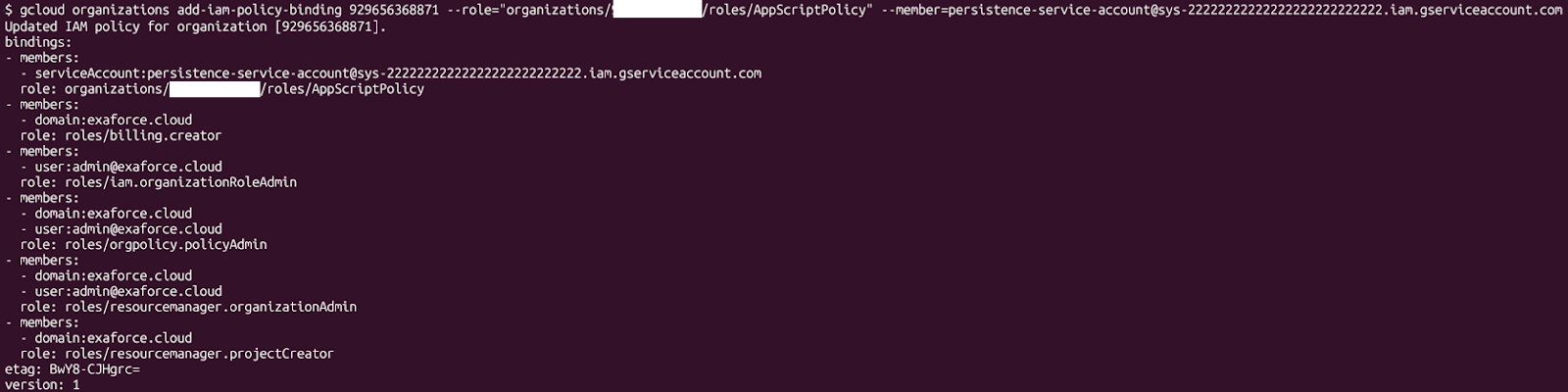
Persistence allows an attacker to return to the target’s infrastructure, ideally as a highly privileged identity. There are different ways to persist in a GCP organization, including user creation service account creation, creating permanent credentials, and creating resources with highly privileged identities assigned to them. If a persistence mechanism can be created inside a project, it can be created into an App Script impersonated project. For example, we can create a service account, create a key for it, assign a highly privileged role on the organization and other projects, and keep it for later use.

<figure><img src="https://cdn.prod.website-files.com/67e6900e4370de1b108ab81b/68bf21c333593cadde17e949_87c4fd66.png" alt="gcloud IAM policy binding output showing roles assigned to Exaforce service accounts."><figcaption><p><em>Creating a service account in a hidden project</em></p></figcaption></figure>

To make matters worse, the identity will only be listed if the project name is known. We can even put a policy on the project that prevents anybody from accessing the service account. This isn’t an “unbreakable” prevention, but it might prevent some attempts to clean up the service account, especially since these projects look like they are created and managed by Google.

```javascript
name: organizations/ORG_ID/denyPolicies/deny-service-account-all
displayName: "Restrict all SA usage"
rules:
- denyRule:    
    deniedPrincipals:
    - principalSet://goog/public:all    
    deniedPermissions:    
    - iam.serviceAccounts.*
```

### Why even impersonate an Apps Script project? <a href="#why-even-impersonate-an-apps-script-project" id="why-even-impersonate-an-apps-script-project"></a>

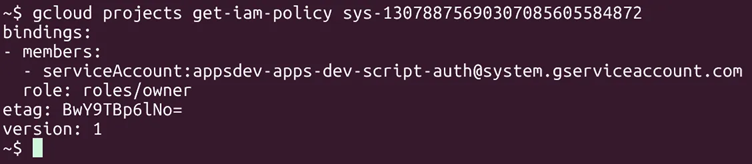
An Apps Script project underneath is a normal GCP project. What differs from a normal project is that by default, no identity, except for one identity controlled by Google, will have the right access to it. The service account `appsdev-apps-dev-script-auth@system.gserviceaccount.com` is the universal identity that creates the Apps Script projects and is only managed by Google. It is the only identity that, by default, can manage the Apps Script project and its resources.

<figure><img src="https://cdn.prod.website-files.com/67e6900e4370de1b108ab81b/68bf22289afa2df62f5cf881_47444e9c.png" alt="Terminal output showing gcloud IAM policy for project with service account owner role."><figcaption><p><em>Showing how only a Google account can access a true Apps Script project by default</em></p></figcaption></figure>

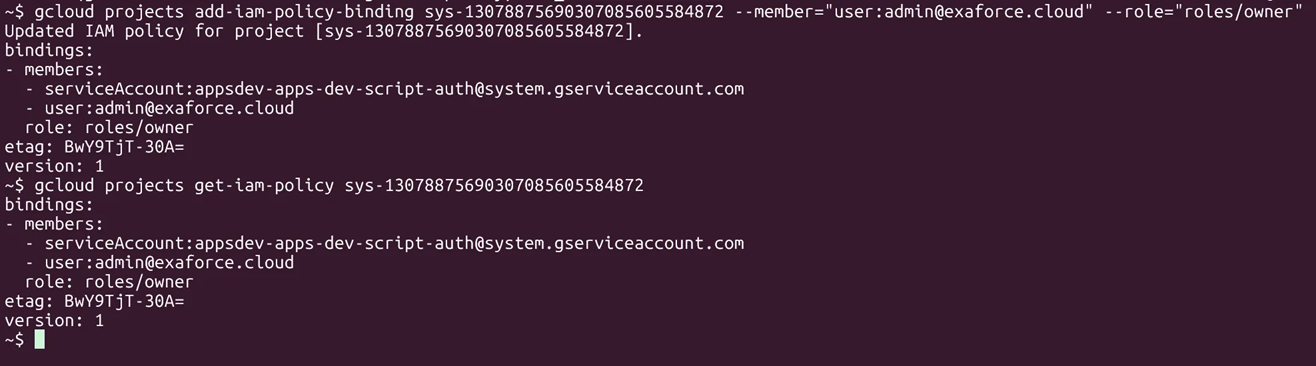
An attacker with the right permissions can modify the project’s IAM policy to allow itself to host any resource on any service it wants on this project.

<figure><img src="https://cdn.prod.website-files.com/67e6900e4370de1b108ab81b/68bf2234bf7df1d9ace70691_1b65ae47.png" alt="gcloud command adding admin@exaforce.cloud  as owner and verifying IAM policy update."><figcaption><p><em>Updating the project policy to allow an attacker access to modify a real Apps Script project</em></p></figcaption></figure>

For example, a bad actor could:

* Creating a service account and assigning an organization policy to it to persist in the target organization
* Link the project to a Billing Account and create large resources on it for cryptomining

### Detecting the abuse of Apps Script projects <a href="#detecting-the-abuse-of-apps-script-projects" id="detecting-the-abuse-of-apps-script-projects"></a>

#### Finding project impersonation by looking at the billing information of the project

GCP has different billing types for resources, with some free without limits. IAM identities are a good example of such resources. Other examples of free resources include IAM resource manager organizations, artifact registry, VPC basic networking, and more.

To be able to use a specific service and its resources, an organization owner needs to link a project to a Billing Account. Linking a project to a Billing Account is a fancy way of saying “put a payment method on the project”. The Billing Account links a payment method with the project, and each month, based on the usage of resources, the owner of the project pays, while the Billing Account provides them with an invoice for the costs.

Being able to create a large compute instance means a Billing Account needs to be linked to the project. One way to detect if an App Script project is created by an attacker and used as a host for large resources is to see if the project is linked to a Billing Account. In the example below, project `sys-22222222222222222222222222`, which is an attacker created project with a large compute instance, will have a Billing Account linked to it (as seen by the fields `billingAccountName` and `billingEnabled`), while a legitimate App Script project (project `sys-14600875379148140018929136`) does not require a link to a billing account.

<figure><img src="https://cdn.prod.website-files.com/67e6900e4370de1b108ab81b/68bf224a28628f21974fbbee_7d7a062b.png" alt="Terminal shows billing account linked for one project but missing for another, indicating disabled billing."><figcaption><p><em>Comparison of a hidden project attached to a billing account and a legitimate Apps Script project not attached to a billing account</em></p></figcaption></figure>

#### Blending the project in by modifying billing information

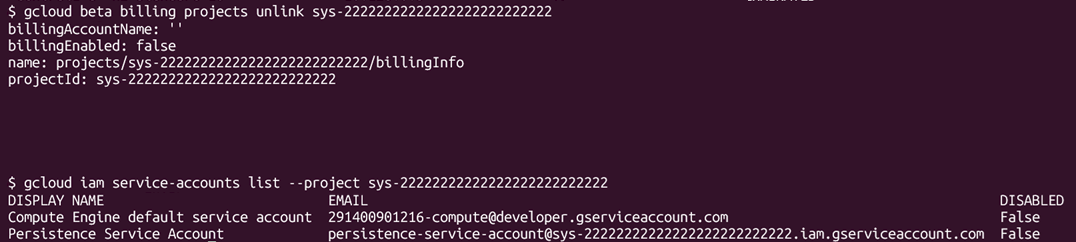
One bypass to this detection is to unlink the project from the Billing Account. The project will need to be part of the billing account if the attacker wants to create an instance (or any paid service). So, any resource or service not offered in the free-tier will need to be deployed into a project with a linked Billing Account.

Unlinking the project from the Billing Account will result in the resource being deleted.

<figure><img src="https://cdn.prod.website-files.com/67e6900e4370de1b108ab81b/68bf2261541d2df19dfaea63_77f8e258.png" alt=""><figcaption><p><em>Unlinking a billing account that deletes the instance</em></p></figcaption></figure>

IAM service accounts do not fall into the paid resources scope, so even a project not linked to a billing account can contain a persistent service account, breaking the previous detection.

<figure><img src="https://cdn.prod.website-files.com/67e6900e4370de1b108ab81b/68bf226d72f7976405b9ac47_a9c2c0a5.png" alt="Output showing disabled billing and two listed service accounts in the GCP project."><figcaption><p><em>Unlinking a billing account while persisting a service account</em></p></figcaption></figure>

#### Finding occurrences of an App Script project impersonation through enabled API Services

To be able to use a specific service on a project through the API (which `gcloud` uses), the service API needs to be enabled. By default, a new project will have several services enabled, with more services being able to be enabled or disabled using `serviceusage.services.enable` or `serviceusage.services.disable`.

Apps Script projects, on the other hand, by default will have no services enabled, but they can be enabled based on demands. One way to detect if a project is not actually an Apps Script project is to look at the enabled services.

<figure><img src="https://cdn.prod.website-files.com/67e6900e4370de1b108ab81b/68bf2279549c0f3150c0b2ae_bad7bc32.png" alt="Comparison of enabled Google Cloud services lists for two different projects."><figcaption><p><em>Listing servies for real and fake Apps Script projects</em></p></figcaption></figure>

#### Blending in by disabling API endpoints

One problem with this detection method is that an Apps Script project might need some services enabled, based on the task they will execute. An attacker can choose to disable all the services they are not using and make the project seem a bit more legitimate.

<figure><img src="https://cdn.prod.website-files.com/67e6900e4370de1b108ab81b/68bf22851d427355a74351fa_fcca596a.png" alt="Terminal loop disabling multiple Google Cloud services successfully for a project."><figcaption><p><em>Disabling unused services to appear more like a real Apps Script project</em></p></figcaption></figure>

For example, to be able to create a compute instance in the project, `compute` and `oslogin` services need to be enabled. If disabled while a resource exists, the execution will fail, indicating current project usage. Other than that, the rest of the services can be disabled and then be temporarily re-enabled by the attacker each time a task executes on the target’s environment.

<figure><img src="https://cdn.prod.website-files.com/67e6900e4370de1b108ab81b/68bf22851d427355a74351fd_6cb07fbb.png" alt="Error message when disabling a compute service that still has active resources."><figcaption><p><em>Execution failure when a service is disabled</em></p></figcaption></figure>

Another problem is that some service APIs will work in a project without the service API being enabled on the project. So, services like IAM or some basic storage commands will be allowed, as well as the service usage API (so that the service APIs can be enabled or disabled on the project) and Resource Manager.

* IAM
* Cloud Resource Manager
* Service Usage API
* Cloud Storage (base functionality is always available; enabling billing gives extra control, billing, and metrics).

This means, a project showing no services enabled will still be able to host a service account, which can be used as a persistence mechanism by the attacker.

#### Finding occurrences of an App Script project impersonation in the Logs

Another detection approach is looking at the logs for the `apps-script` folder. In the example below, the projects created by the attacker (`sys-11111111111111111111111111` and `sys-22222222222222222222222222`) have the `principalEmail` field set to the creator’s user email, while the ones created by Google have an email of `appsdev-apps-dev-script-auth@system.gserviceaccount.com`. This is tricky because the events can only be found under the folder’s events, not the Organization’s.

<figure><img src="https://cdn.prod.website-files.com/67e6900e4370de1b108ab81b/68bf22a838f52190a8620ec8_bfc29c7c.png" alt="Log entries showing multiple CreateProject actions by different service accounts in GCP."><figcaption><p><em>Logs showing the differences in principalEmail from fake and legitimate Apps Script projects</em></p></figcaption></figure>

### Limiting Project Impersonation using organization policies <a href="#limiting-project-impersonation-using-organization-policies" id="limiting-project-impersonation-using-organization-policies"></a>

Apps Script projects, when created, will have an ID format of `sys-<26 random digits>`. One way to prevent project creation of an Apps Script impersonator would be to deny the creation and update of projects with an ID format of `sys-<26 random digits>` using the following policy.

```javascript
name: >-

organizations/012345678912/customConstraints/custom.denyAppsScriptProjectImpersonation
resource_types: cloudresourcemanager.googleapis.com/Project
method_types:
  - CREATE
  - UPDATE
condition: 'resource.projectId.matches(''sys-[0-9]{26}'')'
action_type: DENY
display_name: Deny Apps Script Project Impersonation
description: ''
```

Whenever an attacker tries to create a project with that format, the organization policy will deny the execution.

<figure><img src="https://cdn.prod.website-files.com/67e6900e4370de1b108ab81b/68bf22cb275bafb737af0f42_83b39441.png" alt="Error showing project creation denied due to organization policy constraints in GCP."><figcaption><p><em>Organization policy blocking a hidden project creation</em></p></figcaption></figure>

The Organization Policy will deny the creation of any project with an ID format of `sys-<26 random digits>`, including legitimate ones created by Google through the endpoint `script.google.com`.

<figure><img src="https://cdn.prod.website-files.com/67e6900e4370de1b108ab81b/68bf22d72ff7940e369c5976_eecd02b8.png" alt=""><figcaption><p><em>Blocked Apps Script project creation</em></p></figcaption></figure>

### Preventative controls <a href="#preventative-controls" id="preventative-controls"></a>

We also recommend the enforcement of the organization policy mentioned above that blocks creation of projects with IDs matching `sys-[0-9]{26}` if Apps Script is not in use at the organization. This will lower your attack surface and greatly improve the security posture of your organization.

### Stealthy persistence and defense <a href="#stealthy-persistence-and-defense" id="stealthy-persistence-and-defense"></a>

Apps Script projects can serve as stealthy persistence mechanisms if left unmonitored. Attackers can impersonate them to hide cryptomining, privileged service accounts, or other malicious resources inside your environment.

Defenders need to understand how Apps Script projects work under the hood and how to detect and block potential abuse. Leveraging organization policies and strong detections, provides comprehensive coverage for this persistence vector.