> For the complete documentation index, see [llms.txt](https://blog.pepperclipp.com/pepperclipp-public/llms.txt). Markdown versions of documentation pages are available by appending `.md` to page URLs; this page is available as [Markdown](https://blog.pepperclipp.com/pepperclipp-public/aws/ransomwhen-i-never-even-noticed-it....md).
# RansomWhen??? I Never Even Noticed It…
Article originally posted on Permiso's blog: https\://permiso.io/blog/ransomwhen-i-did-not-even-notice-it
A successful ransomware attack is the culmination of numerous steps performed by a determined attacker: gaining initial access to the victim’s environment, enumerating privileges to identify sensitive data, escalating privileges to gain access to the identified data, and finally encrypting the original data before demanding the ransom payment (with the optional exfiltration step beforehand if an extortion play is on the table).
The encryption process itself is straightforward. After the data is accessed, a cryptographic key (usually an asymmetric key) is used to encrypt the original data, rendering the data unrecoverable by any identity not possessing the key. If the attacker first downloads the data to be used as a potential extortion leverage during the ransom process, this requires attacker-controlled infrastructure to support this data transfer and storage outside the victim’s environment, all while attempting to evade any potential outbound data transfer alerting mechanisms in the target’s environment.
What if this was not necessary and the attacker could simply use the victim’s own infrastructure while nullifying them any access to the data? Creativity is key when discovering new ways to attack a target, achieving a goal with little detection while using the least amount of resources.
Permiso’s P0 Labs research team identified several ways to abuse features allowed by AWS KMS (Key Management Service) to encrypt data on a target's buckets as part of a ransomware attack. This blog will touch upon detection opportunities that might help defenders mitigate these attack vectors through the help of **RansomWhen**, a new open-source tool we are releasing to aid all organizations in detecting usage of these ransomware TTPs in CloudTrail logs and enumerating identities that possess specific combinations of privileges corresponding to these TTPs.
## KMS Ransomware
The idea of using KMS as a ransomware tool was first published by Spencer Gietzen from (then) Rhino Security Labs. He wrote two articles demonstrating how KMS keys can be utilized to encrypt S3 Buckets and lead to extortion:
*
*
At Permiso we discovered many more scenarios where KMS can facilitate the direct encryption of data for ransomware or can be used to tamper with the delivery of CloudTrail logs. For a deep-dive on seven specific attacks leveraging abuse of KMS keys and their corresponding policies (as well as defense recommendations), please refer to the following blog post:
## RansomWhen?
All this research led to the creation of Permiso’s newest open-source tool - **RansomWhen** - a customizable Python-based tool designed to aid defenders in countering these KMS-based ransomware scenarios. This tool’s capabilities include detecting potential ransomware attempts for a specific account based on evidence in CloudTrail logs, while also proactively enumerating identities with access to use KMS keys in various ways to encrypt or otherwise deny access to data residing in an S3 bucket.
### Installation
#### **Local Installation**
To get started simply install the required libraries:
> python3 -m venv ./venv\
> source venv/bin/activate\
> python3 -m pip install -r requirements.txt
Then run the tool by executing ransomwhen.py:
> (venv) $ python3 ransomwhen.py -h\
> \
> usage: ransomwhen.py \[-h] {IDENTITIES,EVENTS} ...\
> \
> RansomWhen???\
> \
> positional arguments:\
> {IDENTITIES,EVENTS} Select the check on the account (the choices are IDENTITIES, EVENTS)\
> IDENTITIES IDENTITIES specific arguments\
> EVENTS EVENTS specific arguments\
> \
> options:\
> -h, --help show this help message and exit
#### **Docker**
A Dockerfile is placed inside the main directory of the project. To build the image, inside the main directory of the project run:
> docker build -t ransomwhen .
Then run the container with directory \~/.aws mounted to host:
> $ docker run -v \~/.aws\:/root/.aws -it ransomwhen -h\
> \
> usage: ransomwhen.py \[-h] {IDENTITIES,EVENTS} ...\
> \
> RansomWhen???\
> \
> positional arguments:\
> {IDENTITIES,EVENTS} Select the check on the account (the choices are IDENTITIES, EVENTS)\
> IDENTITIES IDENTITIES specific arguments\
> EVENTS EVENTS specific arguments\
> \
> options:\
> -h, --help show this help message and exit
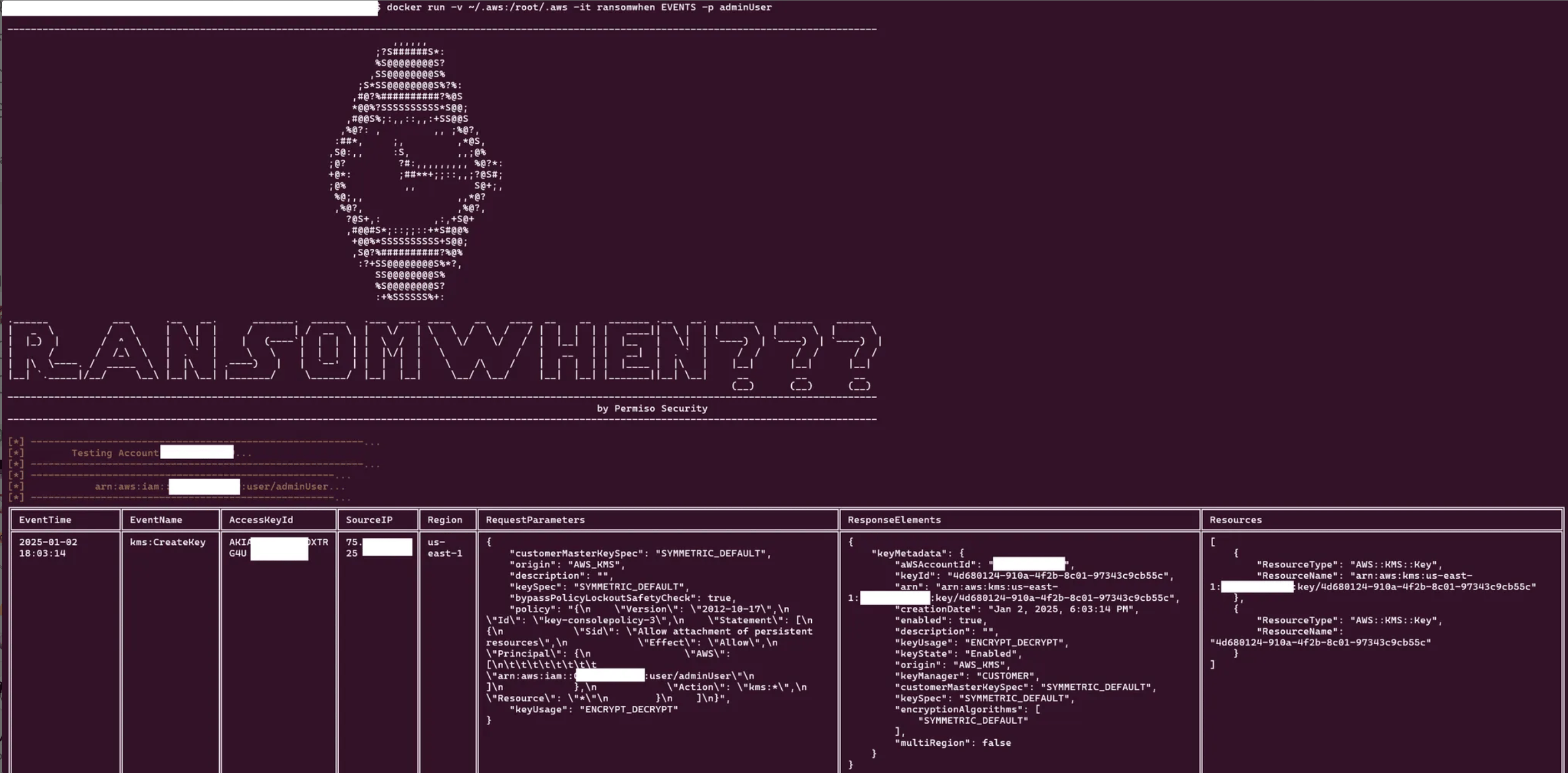
The tool has two nested Argument Parsers, IDENTITIES and EVENTS. IDENTITIES will list all identities with privileges to any of the ransomware scenarios and EVENTS will list malicious events related to ransomware for each identity.
### **Enumerating Identities**
To enumerate the identities containing privilege-combinations related to ransomware capabilities, the tool loads the JSON configuration file located at `scenarios/scenarios.json` which contains the necessary list of privileges for thirteen (13) different attacks shown below:
> Attach Custom KMS Key Store\
> Create Locked Key and Encrypt Bucket using CopyObject\
> Create Locked Key and Encrypt Bucket using Get/Put Object\
> Create Role, Add Inline Policy and Delete\
> Create Role, Attach Inline Policy and Delete\
> Create User, Add Inline Policy and Delete\
> Create User, Attach Inline Policy and Delete\
> Delete CloudTrail Trail\
> Stop Logging\
> Stop Logging using KMS\
> Update Current Custom KMS Key Store\
> Update Key Policy to Lock Key and Encrypt Bucket using CopyObject\
> Update Key Policy to Lock Key and Encrypt Bucket using Get/Put Object
This JSON file is easily configurable with the following format, each scenario having a title and a list of privileges to check.
> {\
> "Create Locked Key and Encrypt Bucket using CopyObject": \[\
> "kms:CreateKey",\
> "s3:PutBucketEncryptionConfiguration",\
> "s3:CopyObject"\
> ]\
> }
In the output results, each scenario will display one of the following statuses:
* **allowed** (for cases when all the privileges in a scenario are allowed)
* **partially** (for cases when at least one privilege in a scenario is allowed)
* **denied** (for cases when no privilege in a scenario is allowed)
### **Finding Malicious Events**
To find identities which have performed these potentially-malicious events, the tool loads the JSON configuration file located at `scenarios/events.json`. This file is similarly configurable with a sample format below, each event having its relevant properties set to either null or a value, just as it is supposed to be saved in the CloudTrail logs:
> {\
> "CreateKey": {\
> "UserAgent": null,\
> "Identity": null,\
> "RequestParameters": null,\
> "ResponseElements": null,\
> "ErrorCode": null,\
> "ErrorMessage": null,\
> "EventSource": "kms.amazonaws.com"\
> }\
> }
The following events are included in the default checks against all API-accessible CloudTrail logs. As seen above, each event can be configured to check for specific indicators.
> kms:CreateKey\
> kms:PutKeyPolicy\
> kms:ReEncrypt\
> kms:CreateCustomKeyStore\
> kms:UpdateCustomKeyStore\
> kms:ConnectCustomKeyStore\
> kms:DisconnectCustomKeyStore\
> kms:DeleteCustomKeyStore\
> s3:PutBucketEncryptionConfiguration\
> s3:CopyObject\
> s3:PutObject\
> s3:GetObject\
> iam:CreateUser\
> iam:DeleteUser\
> iam:CreateRole\
> iam:DeleteRole\
> iam:AttachUserPolicy\
> iam:PutUserPolicy\
> iam:AttachRolePolicy\
> iam:PutRolePolicy\
> cloudtrail:StopLogging\
> cloudtrail:DeleteTrail\
> cloudtrail:UpdateTrail
Finally, running the tool will query the CloudTrail API and list all the identities (IAM users and roles) and the related events they have executed over the last ninety (90) days (the lookback limit for the CloudTrail API).
## Conclusion
If there is one main takeaway from this article then it is this: just because a vendor or cloud service provider has offered functionality for their customers does not mean that same functionality cannot be used nefariously by threat actors. Attackers are becoming smarter and finding new ways to attack their targets while still living off the land (even when the land is in the cloud!).
Defenders must be vigilant in applying the following best practices to their infrastructure to mitigate the aforementioned attacks:
* Continuously monitor which identities (human and non-human) have access to sensitive data or sensitive services like KMS.
* Always enable S3 bucket versioning and MFA delete with least privilege in mind for the identities that have access to MFA.
* Limit account and organization level access if your account is part of an organization.
For a point-in-time check on a small slice of these techniques, you can access **RansomWhen** on GitHub: