> For the complete documentation index, see [llms.txt](https://blog.pepperclipp.com/pepperclipp-public/llms.txt). Markdown versions of documentation pages are available by appending `.md` to page URLs; this page is available as [Markdown](https://blog.pepperclipp.com/pepperclipp-public/aws/do-you-feel-in-control-analysis-of-aws-cloudcontrol-api-as-an-attack-tool.md).

# Do you feel in control? Analysis of AWS CloudControl API as an attack tool

"Identity is the new perimeter" gets thrown around a lot in cloud security discussions, and there's a good reason for it. With the right privileges, almost every cloud resource can be managed through APIs.  Each provider has their own way of handling API access through resource-based access control. If your identity has the right permissions for a specific API call, you can execute that action.&#x20;

The thing is, it's hard to remember every single API call you need to get specific information or access certain resources. AWS recognized this problem and created the AWS CloudControl API, a unified API that groups different resources together so you can create, update, delete, or retrieve them in bulk. This makes managing resources much simpler since you don't need to know which specific service, API call, or parameters to use.

But here's the catch: when something is easy for legitimate users, it's usually easy for attackers too. There are already tools available to use the AWS CloudControl API to pull resource information, and the technique is gaining attention.&#x20;

But is it actually a good way to do stealthy enumeration? In this article, we examine what the CloudControl API is, how it simplifies resource management, how attackers can weaponize it, its limitations, and detection methods. To illustrate, Exaforce built [CloudConqueror](https://github.com/ExaForce/CloudConqueror), a tool that automates both attack and detection techniques described here.

### What is AWS CloudControl API? <a href="#what-is-aws-cloudcontrol-api" id="what-is-aws-cloudcontrol-api"></a>

[AWS CloudControl API](https://docs.aws.amazon.com/cloudcontrolapi/) is an API offered by AWS to facilitate the management of services and resources inside an account. It supports creation, read, update, deletion, and listing (CRUD-L) operations, without the need to know the service, API call, or input parameters for the API execution.

From the [AWS API Documentation for CloudControl API](https://docs.aws.amazon.com/cloudcontrolapi/latest/APIReference/Welcome.html): “Use AWS Cloud Control API to create, read, update, delete, and list (CRUD-L) your cloud resources that belong to a wide range of services, both AWS and third-party. With the Cloud Control API's standardized set of application programming interfaces (APIs), you can perform CRUD-L operations on any supported resources in your AWS account. Using Cloud Control API, you won't have to generate code or scripts specific to each service responsible for those resources.”

It also helps with resource management by grouping resources based on one unifying resource, so that several resources are related to the unifying resource. Under the hood, it uses[ CloudFormation schemas](https://docs.aws.amazon.com/cloudcontrolapi/latest/userguide/supported-resources.html). For example, when requesting to retrieve an IAM User, the request will return information formatted as follows:

```javascript
{
  "Type" : "AWS::IAM::User",
  "Properties" : {
      "Groups" : [ String, ... ],
      "LoginProfile" : LoginProfile,
      "ManagedPolicyArns" : [ String, ... ],
      "Path" : String,
      "PermissionsBoundary" : String,
      "Policies" : [ Policy, ... ],
      "Tags" : [ Tag, ... ],
      "UserName" : String
    }
}
```

AWS CloudControl allows seven API calls. Five of them are the standard CRUD-L operations. The remaining two are used to list requests and check the status of create, update, or delete operations.

| Operation                                                          | API Call                   | Required Input Parameters                                                                       |
| ------------------------------------------------------------------ | -------------------------- | ----------------------------------------------------------------------------------------------- |
| List resources of a specific type                                  | `ListResources`            | The resource type to list                                                                       |
| Get a specific resource using an identifier                        | `GetResource`              | The resource type and its name as the identifier                                                |
| Create a resource on the account                                   | `CreateResources`          | The resource type, its name as the identifier, and the resource properties                      |
| Modify a resource’s attributes                                     | `UpdateResource`           | The resource type, its name as the identifier, and the resource properties that will be updated |
| Delete a resource on the account                                   | `DeleteResource`           | The resource type and its name as the identifier                                                |
| List create, delete, and update requests being made on the account | `ListResourceRequests`     | No input required                                                                               |
| Get the status of a specific resource request                      | `GetResourceRequestStatus` | The request token is required as input                                                          |

AWS maintains a[ matrix](https://docs.aws.amazon.com/cloudcontrolapi/latest/userguide/supported-resources.html) containing all the resource types supported by the AWS CloudControl API, with each resource also including the CRUD-L operation supported. There are currently 1,220 resource types supported, split into 237 services.

### The good, the bad, and the ugly of using AWS CloudControl as an attack tool <a href="#the-good-the-bad-and-the-ugly-of-using-aws-cloudcontrol-as-an-attack-tool" id="the-good-the-bad-and-the-ugly-of-using-aws-cloudcontrol-as-an-attack-tool"></a>

#### The good: Accessing Resources using AWS CloudControl

AWS CloudControl API has been used as an [attack tool](https://github.com/welldone-cloud/aws-list-resources) before. It’s mostly used for enumeration, since the API itself can also be used for inventory retrieval of AWS resources. What is less commonly used is AWS CloudControl API’s ability to modify and update resources.

**Retrieving resources**

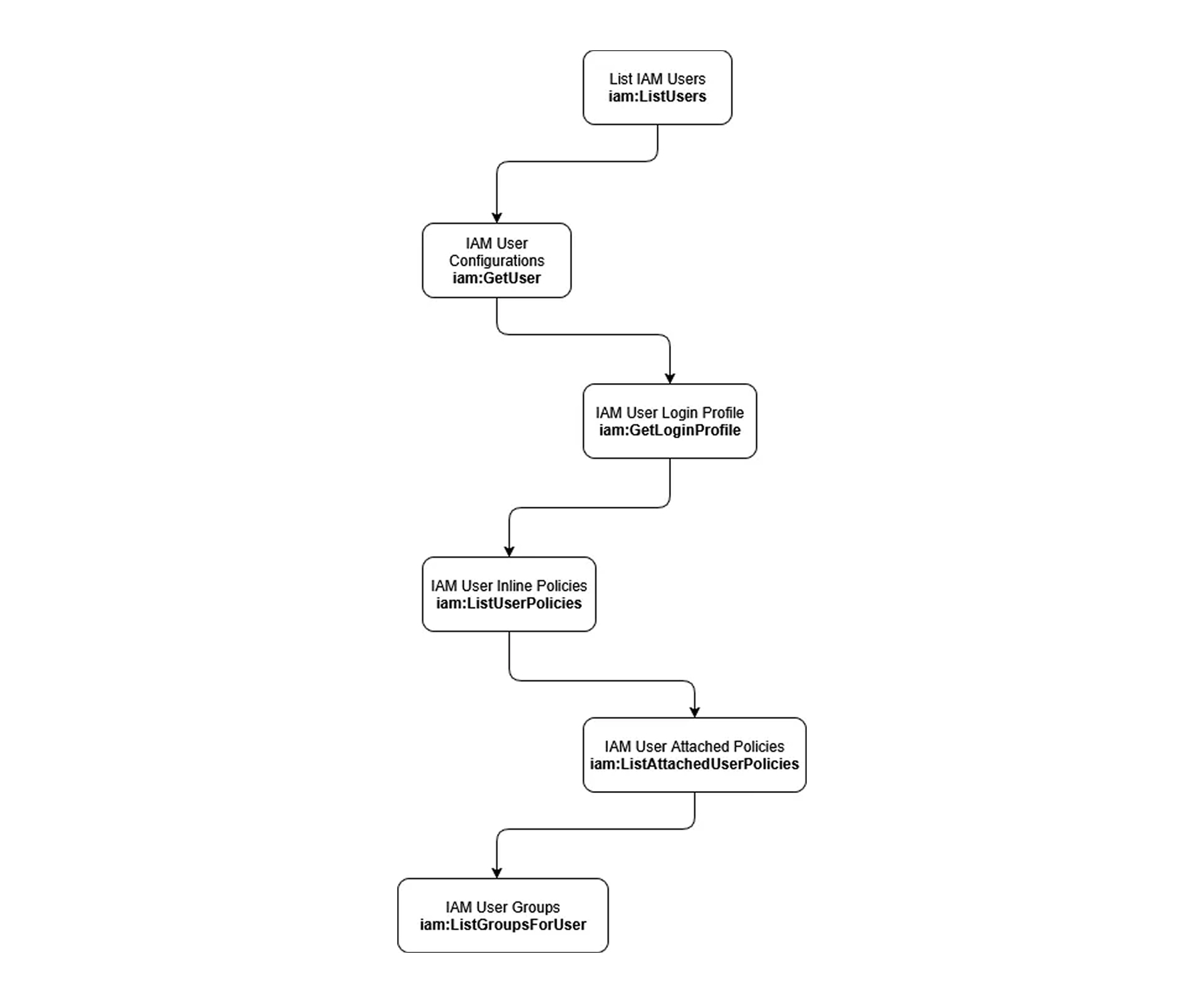
AWS CloudControl API makes it simple to retrieve resource names and their configuration. Normally, if the conventional AWS API is used, retrieving all information about a resource might require several API calls.

<figure><img src="https://cdn.prod.website-files.com/67e6900e4370de1b108ab81b/68e4488993a51c1415e67f77_Exaforce-Blog-Do_You_Feel_In_Control_1.jpg" alt="AWS IAM user data flow showing commands from listing IAM users to retrieving user groups via GetUser and ListUserPolicies."><figcaption><p><em>Typical API call path to retrieve users and relevant data</em></p></figcaption></figure>

Since AWS CloudControl API is using CloudFormation schemas, each resource contains several resources, all grouped by one unifying resource. That means, the schema for an AWS IAM User will contain the user information (username, path, permission boundary, tags), login profile, groups, and policies (attached and inline policies).

```javascript
{
  "Type" : "AWS::IAM::User",
  "Properties" : {
      "Groups" : [ String, ... ],
      "LoginProfile" : LoginProfile,
      "ManagedPolicyArns" : [ String, ... ],
      "Path" : String,
      "PermissionsBoundary" : String,
      "Policies" : [ Policy, ... ],
      "Tags" : [ Tag, ... ],
      "UserName" : String
    }
}
```

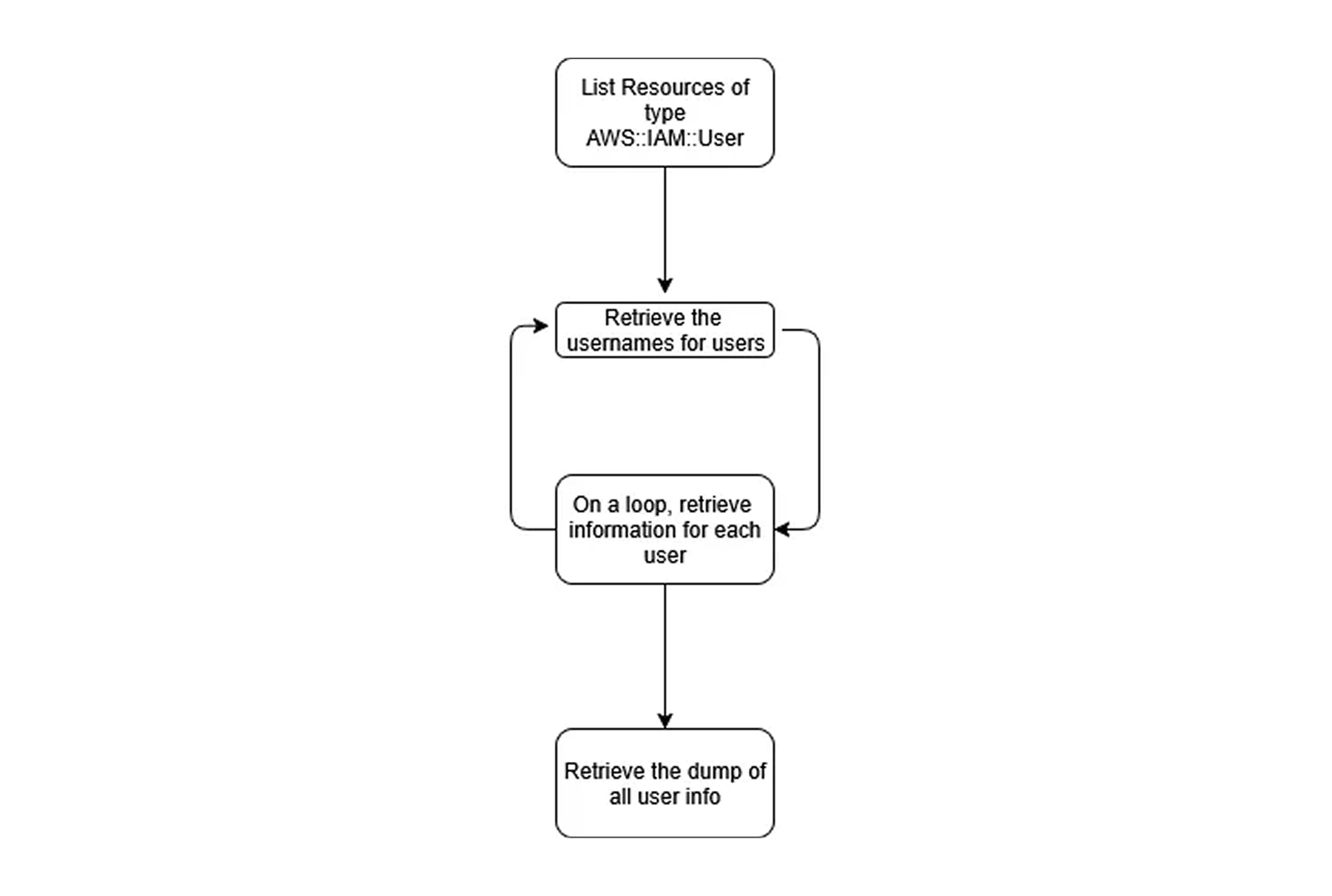
Two API calls allow resource listing or retrieval. `cloudcontrol:ListResources` will list each resource of a type provided.

```javascript
$ aws cloudcontrol list-resources --type-name AWS::IAM::User
```

The output returned from `cloudcontrol:ListResources` is a JSON list of resource identifiers for the specified resource type.

```javascript
{
    "ResourceDescriptions": [
        {
            "Identifier": "someUser",
            "Properties": "{\\"UserName\\":\\"someUser\\"}"
        }
    ],
    "TypeName": "AWS::IAM::User"
}
```

Those identifiers can later be passed to `cloudcontrol:GetResource` to retrieve the information about the resource. The difference is that  `cloudcontrol:GetResource` can retrieve the information formatted as the CloudFormation Schema.

```javascript
$ aws cloudcontrol get-resource --type-name AWS::IAM::User --identifier <identifier>
```

As an enumeration technique, this means we can list all resources on a specific region for a specific resource type using `cloudcontrol:ListResources` and then loop to retrieve the information using `cloudcontrol:GetResource`.

<figure><img src="https://cdn.prod.website-files.com/67e6900e4370de1b108ab81b/68e448c331aa1c1ba55aab76_Exaforce-Blog-Do_You_Feel_In_Control_2.jpg" alt="Flowchart describing AWS IAM user enumeration loop using ListResources and username retrieval."><figcaption><p><em>Process to retrieve a dump of all user information</em></p></figcaption></figure>

**Finding resource names through brute force**

Attackers often find themselves in situations where specific actions are not allowed to be executed due to limited permissions. This might affect the retrieval of some information, such as the identifiers of resources, like names or IDs. That means the attacker will need to find alternative methods to achieve this information before needing to request other information.

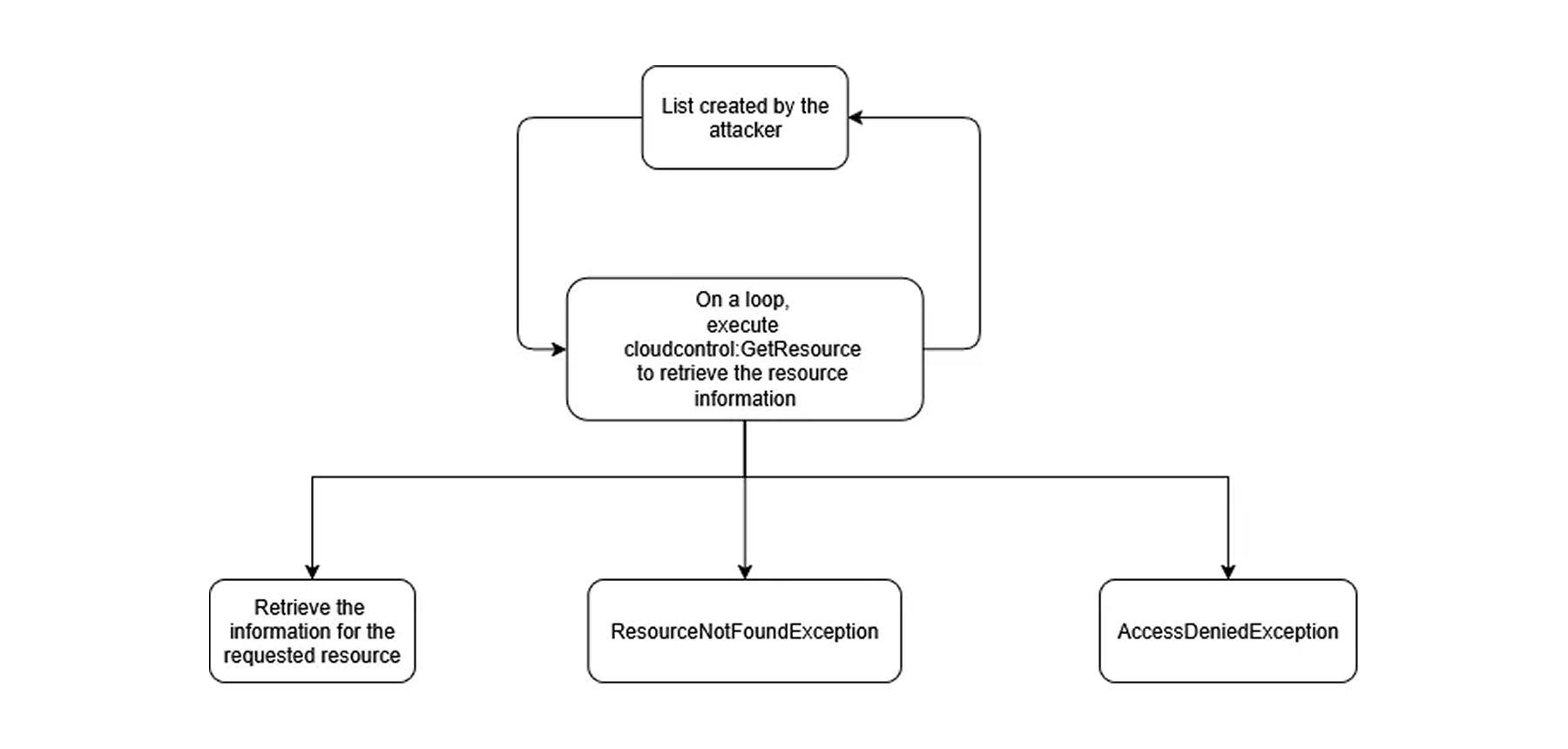
Brute force or guessing are good alternatives to this approach. An attacker with a list of potentially existing resources on the account can path them on `cloudcontrol:GetResource` to find out if a resource exists. If the attacker has access to execute `cloudcontrol:GetResource` and the resource exists, they will receive the information about the target. If they do not have access to execute the API call, they will receive an `AccessDenied` error. And if they have access to execute the API call, but the resource does not exist, they will receive a `ResourceNotFoundException`. Knowing this helps clarify if the assumed role has the proper permissions and if the resource exists.

<figure><img src="https://cdn.prod.website-files.com/67e6900e4370de1b108ab81b/68e448fc737e68d0fc8a3587_Exaforce-Blog-Do_You_Feel_In_Control_3.jpg" alt="Attacker execution flow using AWS CloudControl GetResource command to retrieve resource details or trigger exceptions."><figcaption><p><em>Checking permissions and validating brute forced or guessed data</em></p></figcaption></figure>

**Tampering with resources to gain access to them**

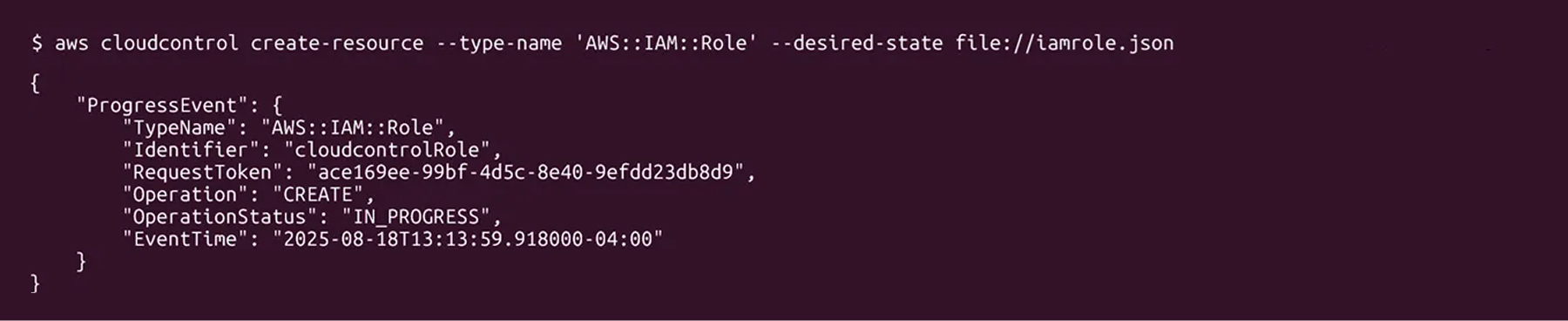
Aside from listing resources and retrieving information about them, AWS CloudControl API offers 3 more API calls, which create, update, and delete the resources on the Account:

* `cloudcontrol:CreateResource`
* `cloudcontrol:UpdateResource`
* `cloudcontrol:DeleteResource`

The input required for creating and updating resources is the `Type` of the resource, the input parameters taken from the CloudFormation Schemas based on the resource type, and to delete and update the resource, the identifier is also required.

<figure><img src="https://cdn.prod.website-files.com/67e6900e4370de1b108ab81b/68e449a1c1465fcd51d17b11_Exaforce-Blog-Do_You_Feel_In_Control_4.jpg" alt="AWS CLI output showing creation of IAM role with cloudcontrol create-resource command in progress."><figcaption><p><em>AWS CLI command using CloudControl to create a role</em></p></figcaption></figure>

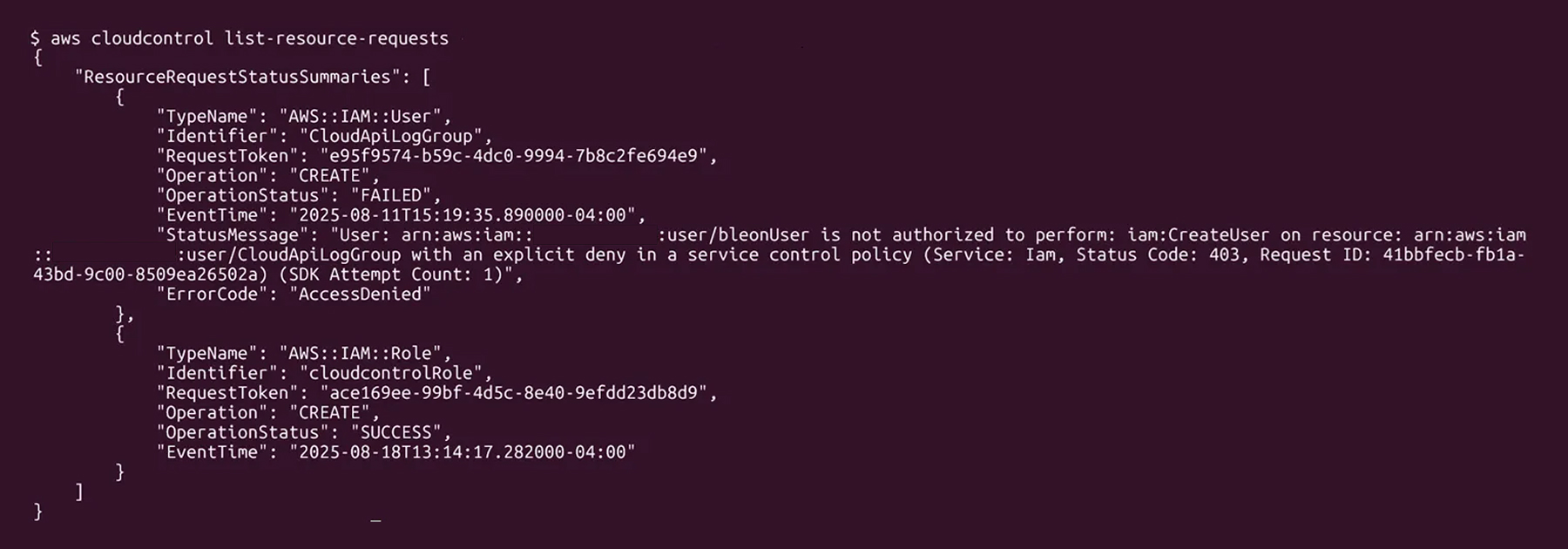
When a request for a CUD (create, update, delete) operation is sent to the CloudControl API, the request is logged by it. Using `cloudcontrol:ListResourceRequests`, we can list the requests and their status (successful or failure), including the error code, in the case of failure. As an enumeration feature, this can be helpful, as it will allow the attacker the ability to retrieve information regarding access a specific identity will have, Organization Level Policies (SCP), and identifier names for resources created and updated.

<figure><img src="https://cdn.prod.website-files.com/67e6900e4370de1b108ab81b/68e449c578946fdfd91300c8_Exaforce-Blog-Do_You_Feel_In_Control_5.jpg" alt="AWS CLI output showing failed IAM user creation due to access denial and successful IAM role creation."><figcaption><p><em>AWS CLI command using CloudControl to list resource requests</em></p></figcaption></figure>

#### The bad: You still need to have permission to execute the call

One of our questions was about how the AWS CloudControl API works and what privileges it requires. If the API only needs CloudControl-specific permissions, it could be a highly dangerous API to leave unchecked.

Looking at the events for a request attempting to retrieve an IAM User, we noticed there are several events being executed. When `cloudcontrol:GetResource` is executed, on the backend, CloudControl makes seven more API requests:

* `iam:GetUser` is executed twice, most likely to retrieve `Username`, `Path`, and `Tags` using one request and `PermissionBoundary` using the second.
* `iam:ListUserPolicies` to retrieve the user’s inline policies
* `iam:GetUserPolicy` to retrieve the policy content, and this might be executed more than once, depending on the number of inline policies assigned to the user
* `iam:ListAttachedUserPolicies` to retrieve AWS and custom managed policies attached to the user
* `iam:GetLoginProfile` will let us know if the user has a `LoginProfile` assigned, meaning they have access to the Management Console
* `iam:ListGroupsForUser` to retrieve a list of IAM Groups the user is part of.

Note that AWS events are not always ordered correctly. If several API calls are executed within a very short time frame, they might take a different order in the event history.

This means the events that provide the necessary information for the inventory will get executed whether the information exists or not. So that creates an issue when it comes to remaining in stealth. This means that attackers will be detected attempting to execute API Calls on the target. This becomes even more of an issue when we try to create and/or update resources, which can lead to the detection tools and teams realizing a potential compromise.

**A broken chain**

But wait. There was a problem with the calls being executed. AWS, when executing the API calls behind the CloudControl API, should not have access to the credentials of the IAM User. So, how are they executing the calls? Looking at one of the requests being made, we notice several things:

* The values for `sourceIPAddress` and `userAgent` are set to `cloudformation.amazonaws.com`, meaning the event is triggered by AWS CloudControl API.
* The request, though being initiated by an IAM User (as indicated by the ARN), has an Access Key starting with `ASIA`, indicating a temporary credential in AWS. The session seems to be executed right before the event, as indicated by the `sessionContext.attributes.creationDate` compared to `eventTime`.

```javascript
{
    "eventVersion": "1.11",
    "userIdentity": {
        "type": "IAMUser",
        "principalId": "AIDA****************",
        "arn": "arn:aws:iam::0123456789012:user/bleonUser",
        "accountId": "0123456789012",
        "accessKeyId": "ASIA4MTWIL**********",
        "userName": "bleonUser",
        "sessionContext": {
            "attributes": {
                "creationDate": "2025-08-15T14:52:54Z",
                "mfaAuthenticated": "false"
            }
        },
        "invokedBy": "cloudformation.amazonaws.com"
    },
    "eventTime": "2025-08-15T14:52:55Z",
    "eventSource": "iam.amazonaws.com",
    "eventName": "ListAttachedUserPolicies",
    "awsRegion": "us-east-1",
    "sourceIPAddress": "cloudformation.amazonaws.com",
    "userAgent": "cloudformation.amazonaws.com",
    "requestParameters": {
        "userName": "bleonUser"
    },
    "responseElements": null,
    "requestID": "00bcc3e5-ed84-4cbb-a8ad-61b252e387bb",
    "eventID": "ced62c58-a981-40b8-9e7c-3666a310e908",
    "readOnly": true,
    "eventType": "AwsApiCall",
    "managementEvent": true,
    "recipientAccountId": "851725277864",
    "eventCategory": "Management"
}
```

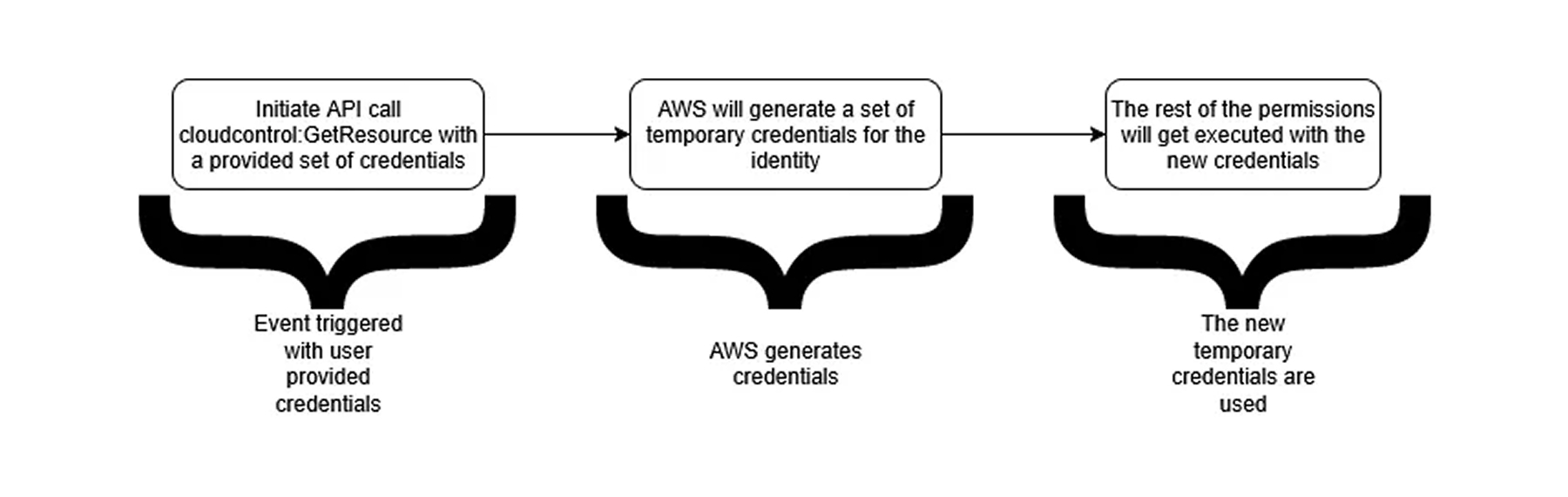
That means AWS generates a set of temporary credentials for the identity and uses those credentials to execute the rest of the calls from an AWS CloudControl API endpoint.

<figure><img src="https://cdn.prod.website-files.com/67e6900e4370de1b108ab81b/68e44a32cc9e30f53b8f44f4_Exaforce-Blog-Do_You_Feel_In_Control_6.jpg" alt="Flowchart showing AWS CloudControl event process"><figcaption><p><em>The process AWS uses to create credentials to make CloudControl API calls</em></p></figcaption></figure>

There are no events in CloudTrail that show the generation of the new credentials. In fact, even creating a policy that only allows the events that are related to AWS CloudControl API will not prevent any attempts to receive the information, and still no event that generated the temporary credentials will be shown on CloudTrail.

```javascript
{
    "Version": "2012-10-17",
    "Statement": [
        {
            "Sid": "Statement3",
            "Effect": "Allow",
            "Action": [
                "iam:GetUser",
                "iam:ListUserPolicies",
                "iam:GetUserPolicy",
                "iam:ListAttachedUserPolicies",
                "iam:GetLoginProfile",
                "iam:ListGroupsForUser",
                "cloudformation:GetResource"
            ],
            "Resource": [
                "*"
            ]
        }
    ]
}
```

#### The ugly: One permission breaks the whole chain

The last question we had was what happens if a specific API call failed? And what would happen to the request if the resource does not have a specific configuration that one of the API calls will retrieve?

If the requesting identity has the right privileges to execute each necessary API call, but the resource does not have some of the information, the output will not include those fields. For example, in the case below, we see the difference in output between a user being part of an AWS IAM Group vs not being part of a group.

```javascript
# User is part of bleonTestGroup IAM Group
{
  "Path": "/",
  "UserName": "bleonUser",
  "Groups": [
    "bleonTestGroup"
  ],
  "Arn": "arn:aws:iam::0123456789012:user/bleonUser",
  "LoginProfile": {
    "PasswordResetRequired": false
  },
  "Tags": [
    {
      "Value": "Prod",
      "Key": "Deployment"
    }
  ]
}

# User is not part of bleonTestGroup IAM Group
{
  "Path": "/",
  "UserName": "bleonUser",
  "Arn": "arn:aws:iam::0123456789012:user/bleonUser",
  "LoginProfile": {
    "PasswordResetRequired": false
  },
  "Tags": [
    {
      "Value": "Prod",
      "Key": "Deployment"
    }
  ]
}
```

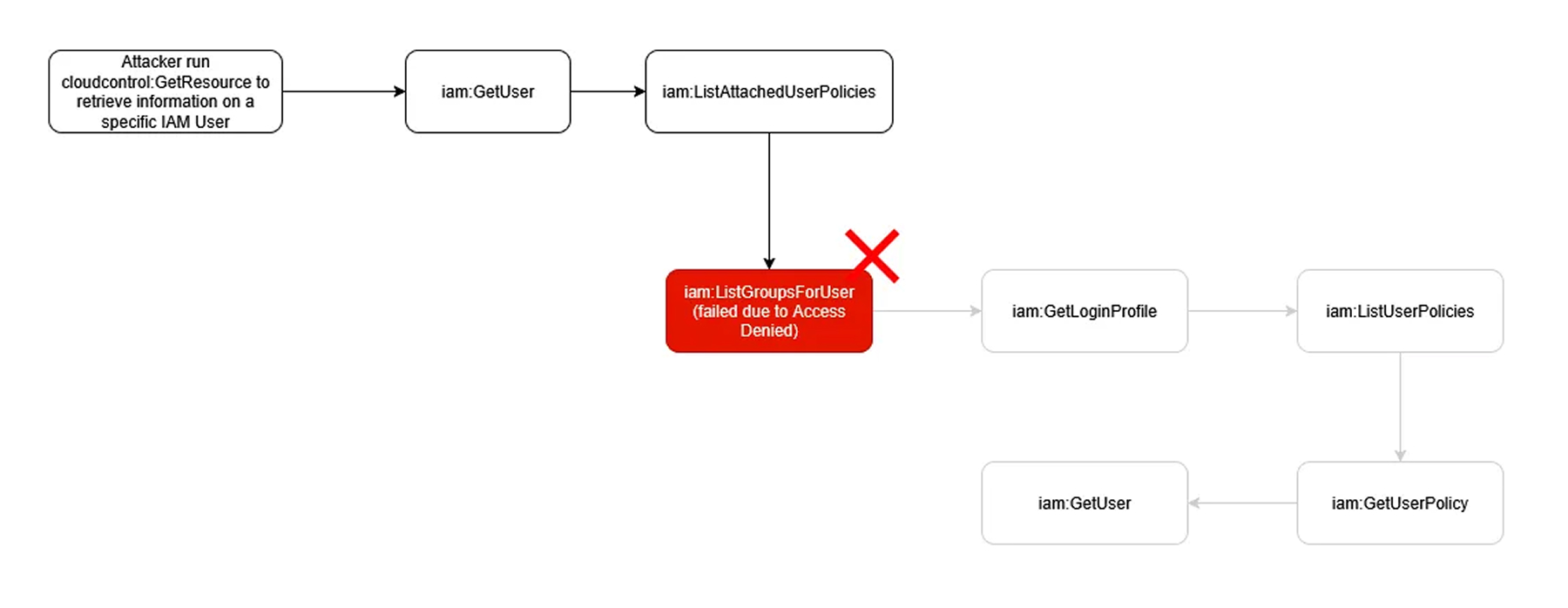
This is different than when the requesting user does not have all the privileges. In AWS IAM Cloud Control, if an API call in the whole transaction of execution fails, the entire request will fail.

<figure><img src="https://cdn.prod.website-files.com/67e6900e4370de1b108ab81b/68e44e2733fddf103d410965_Exaforce-Blog-Do_You_Feel_In_Control_7.jpg" alt="AWS CLI terminal output showing an AccessDeniedException error"><figcaption><p><em>AWS CLI CloudControl get resource that fails with limited permissions</em></p></figcaption></figure>

This means that if an attacker requests information about a user and they do not have access to list the groups (`iam:ListGroupsForUser`), no other information will be returned to the attacker, and they will get an error code indicating a lack of privileges.

<figure><img src="https://cdn.prod.website-files.com/67e6900e4370de1b108ab81b/68e44e4cb8e946e3faa5f146_Exaforce-Blog-Do_You_Feel_In_Control_8.jpg" alt="Flowchart showing an attacker’s use of cloudcontrol:GetResource to retrieve IAM user information"><figcaption><p><em>Flow of a failed API call with limited permissions</em></p></figcaption></figure>

And, the events will still get executed and logged. Meaning, the attacker will not retrieve the information or execute the required task, but will still be logged.

<figure><img src="https://cdn.prod.website-files.com/67e6900e4370de1b108ab81b/68e44e6e0ccd2287cd3c0c30_Exaforce-Blog-Do_You_Feel_In_Control_9.jpg" alt="AWS CloudTrail event log listing actions performed by user bleonUser"><figcaption><p><em>CloudTrail logs showing the failed API calls</em></p></figcaption></figure>

### How effective can AWS CloudControl API be as an attack tool? <a href="#how-effective-can-aws-cloudcontrol-api-be-as-an-attack-tool" id="how-effective-can-aws-cloudcontrol-api-be-as-an-attack-tool"></a>

AWS CloudControl API has many limitations as an attacker tool: the need for extra privileges, the logging of events, as well as the chain being broken the moment the impersonated identity lacks the appropriate privileges. But those limitations, if used correctly, can also be used to persist in an account with high privileges. The policy below will only allow the identity it is assigned to execute an API call related to CloudControl directly, while limiting anything else from only being executed through CloudControl (CloudControl API uses CloudFormation operations, which is why the service is CloudFormation instead of CloudControl).

```javascript
{
    "Version": "2012-10-17",
    "Statement": [
        {
            "Sid": "AllowViaCloudFormation",
            "Effect": "Allow",
            "Action": "*",
            "Resource": "*",
            "Condition": {
                "ForAnyValue:StringEquals": {
                    "aws:CalledVia": "cloudformation.amazonaws.com"
                },
                "Bool": {
                    "aws:ViaAWSService": "true"
                }
            }
        },
        {
            "Sid": "DenyDirectAccess",
            "Effect": "Deny",
            "NotAction": [
                "cloudformation:GetResource",
                "cloudformation:GetResourceRequestStatus",
                "cloudformation:ListResourceRequests",
                "cloudformation:ListResources",
                "cloudformation:UpdateResource",
                "cloudformation:DeleteResource",
                "cloudformation:CreateResource",
                "cloudformation:CancelResourceRequest"
            ],
            "Resource": "*",
            "Condition": {
                "Bool": {
                    "aws:ViaAWSService": "false"
                }
            }
        },
        {
            "Sid": "AllowDirectCloudControlAcccess",
            "Effect": "Allow",
            "Action": [
                "cloudformation:GetResource",
                "cloudformation:GetResourceRequestStatus",
                "cloudformation:ListResourceRequests",
                "cloudformation:ListResources",
                "cloudformation:UpdateResource",
                "cloudformation:DeleteResource",
                "cloudformation:CreateResource",
                "cloudformation:CancelResourceRequest"
            ],
            "Resource": "*"
        }
    ]
}
```

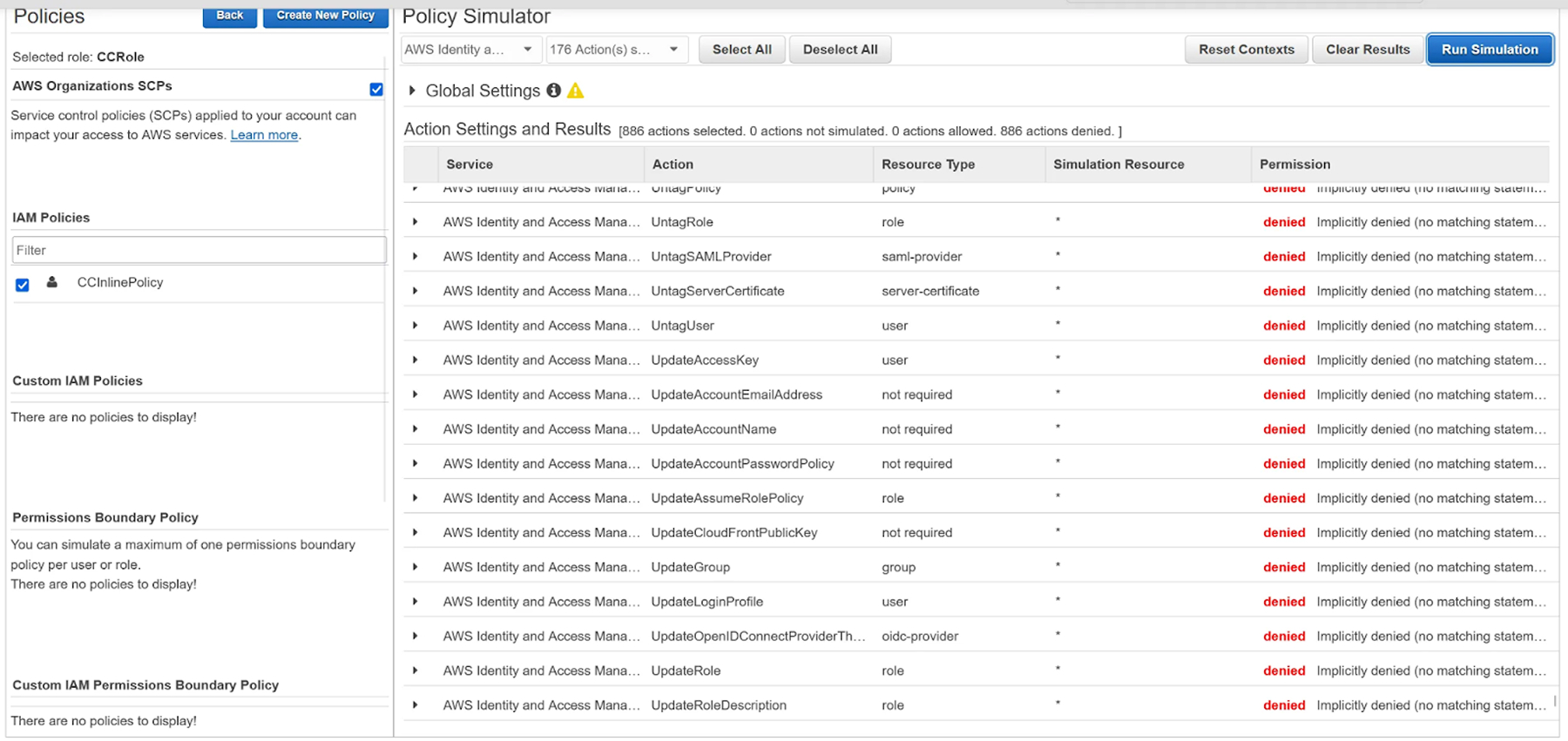
The Policy simulation also lists any event as prevented, making the persistence even stealthier.

<figure><img src="https://cdn.prod.website-files.com/67e6900e4370de1b108ab81b/68e44e9ad0836f49abfaf4e8_Exaforce-Blog-Do_You_Feel_In_Control_10.jpg" alt="Screenshot of AWS IAM Policy Simulator for role “CCRole”"><figcaption><p><em>Policy simulator showing blocked events</em></p></figcaption></figure>

Attempting to execute any request outside of the ones CloudControl allows will fail, due to the 2nd Statement in the Policy (`DenyDirectAccess`).

<figure><img src="https://cdn.prod.website-files.com/67e6900e4370de1b108ab81b/68e44ecfa8beff2eacd1f83e_Exaforce-Blog-Do_You_Feel_In_Control_11.jpg" alt="AWS CLI error showing AccessDenied for GetRole on cloudcontrolRole5."><figcaption><p><em>AWS CLI command blocked due to strict permissions</em></p></figcaption></figure>

But, attempting to execute an API call (any CRUD-L operation) through the CloudControl API will be allowed.

<figure><img src="https://cdn.prod.website-files.com/67e6900e4370de1b108ab81b/68e44ef568f5d515ef552816_Exaforce-Blog-Do_You_Feel_In_Control_12.jpg" alt="AWS CLI output showing cloudcontrol create-resource command in progress."><figcaption><p><em>AWS CLI command successfully completed when using the CloudControl API</em></p></figcaption></figure>

The identity this policy is assigned to will have Administrator Access, while looking like a normal, non-administrative identity.

#### Detecting overprivileged policies

There is one issue with this policy. It still allows permissions to services; it just proxies them through the AWS CloudControl API.

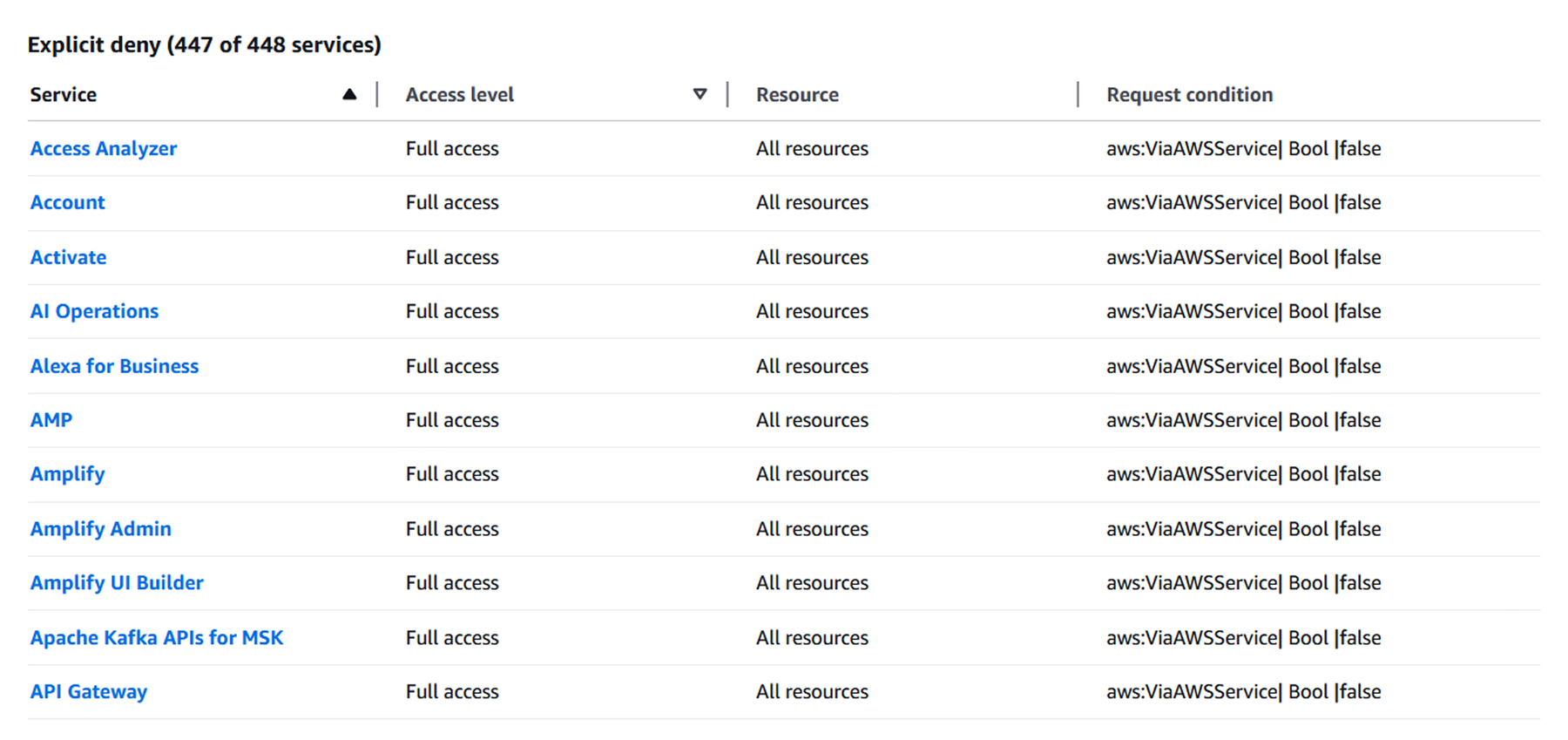
Looking at the IAM policy creator, AWS will list all services but the CloudControl API as Explicit Deny, meaning the identity will not be able to execute those permissions.&#x20;

<figure><img src="https://cdn.prod.website-files.com/67e6900e4370de1b108ab81b/68e44f1478aecd43fc2d42a9_Exaforce-Blog-Do_You_Feel_In_Control_13.jpg" alt="AWS console showing explicit deny for 447 of 448 services with full access."><figcaption><p><em>List of explicit denies that lists all services except the CloudControl API</em></p></figcaption></figure>

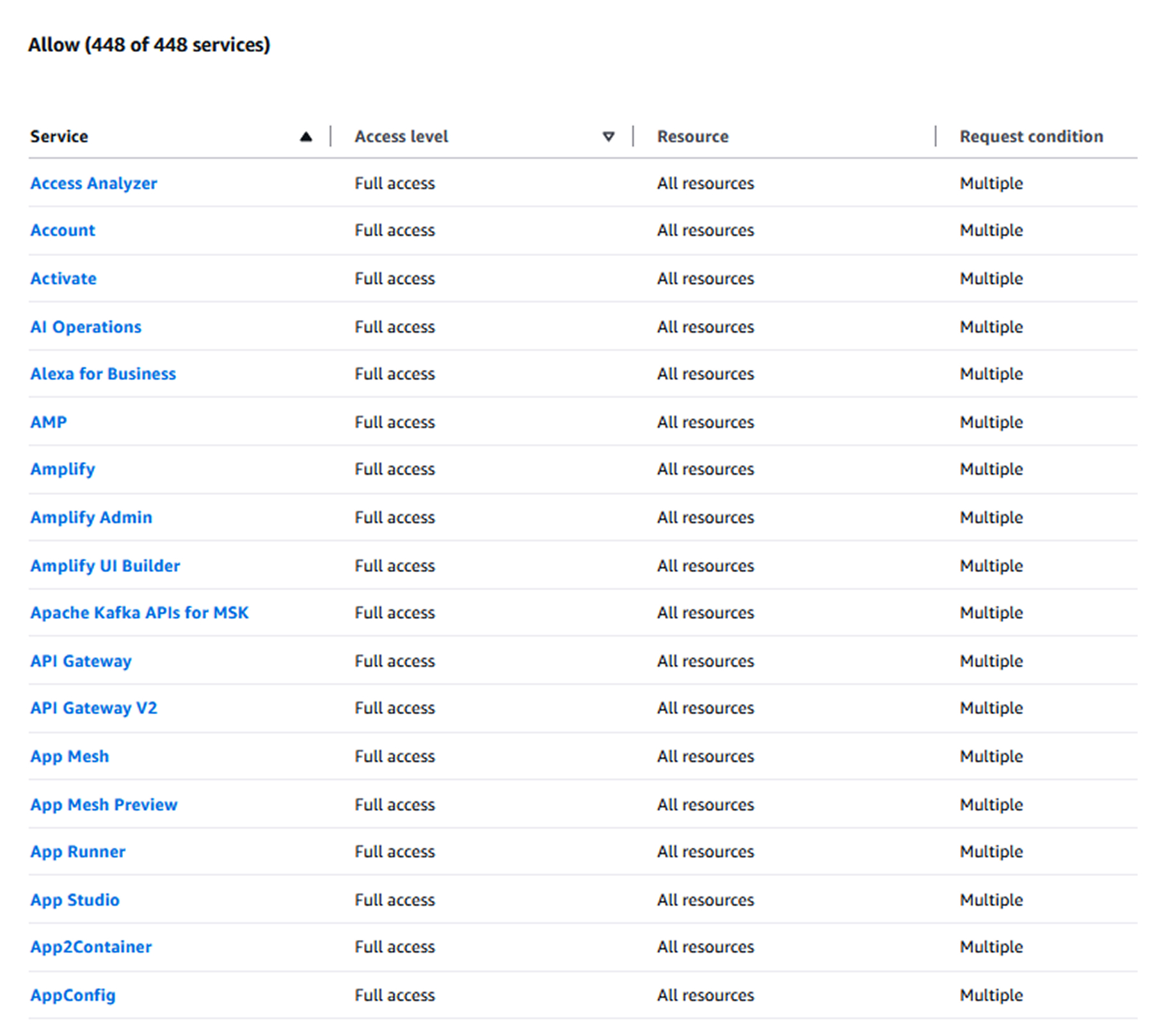
However, looking at the allowed services section, we see that all of the services are actually marked as Allowed. This makes the persistence technique detectable.

<figure><img src="https://cdn.prod.website-files.com/67e6900e4370de1b108ab81b/68e44f1f45b283fd4bc07fce_Exaforce-Blog-Do_You_Feel_In_Control_14.jpg" alt="AWS console showing allow for all 448 services with full access permissions."><figcaption><p><em>Allowed services show the services that are truly allowed</em></p></figcaption></figure>

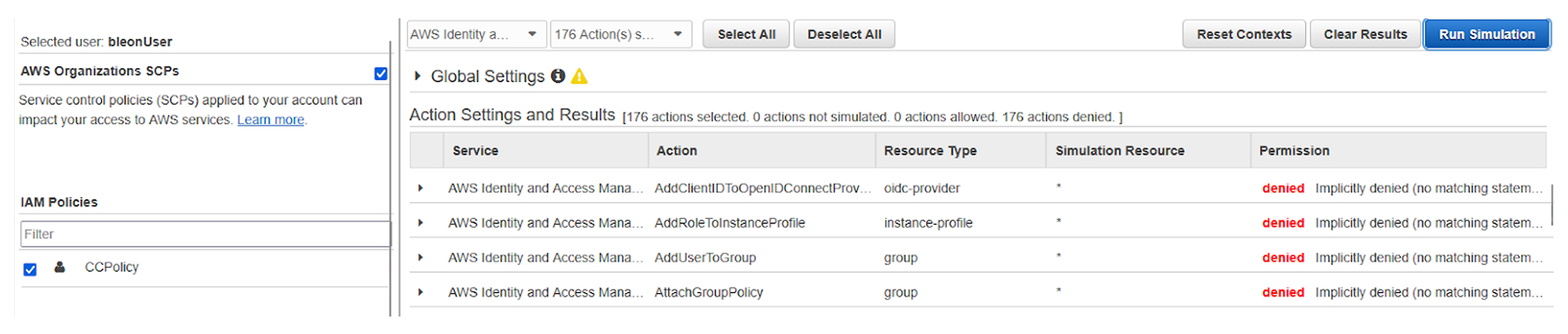
Both AWS Simulator and the tests executed will still show access as denied for this identity.

<figure><img src="https://cdn.prod.website-files.com/67e6900e4370de1b108ab81b/68e44ef568f5d515ef552816_Exaforce-Blog-Do_You_Feel_In_Control_12.jpg" alt="AWS console showing allow for all 448 services with full access permissions."><figcaption><p><em>AWS CLI showing an explicit deny for the API call</em></p></figcaption></figure>

<figure><img src="https://cdn.prod.website-files.com/67e6900e4370de1b108ab81b/68e45030dc8ac741a26f0404_Exaforce-Blog-Do_You_Feel_In_Control_16.jpg" alt="AWS policy simulator showing denied IAM actions for user bleonUser."><figcaption><p><em>Policy simulator showing the service permissions as denied</em></p></figcaption></figure>

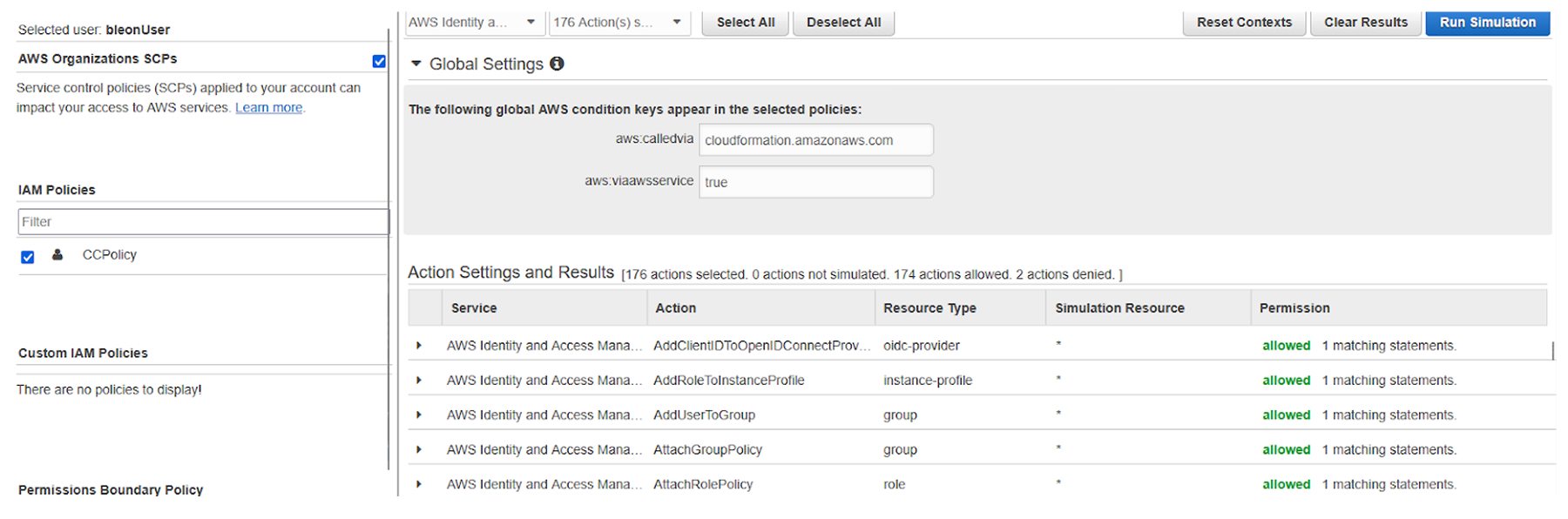
Knowing the condition that is included in the policy, we can actually use IAM Policy Simulator to prove we do have administrative access on the account:

<figure><img src="https://cdn.prod.website-files.com/67e6900e4370de1b108ab81b/68e45138260512bca15de5e0_Exaforce-Blog-Do_You_Feel_In_Control_17.jpg" alt="AWS policy simulator showing allowed IAM actions when called via AWS service."><figcaption><p><em>Rerunning the policy simulator with the right policy, showing it does have admin access</em></p></figcaption></figure>

### CloudConqueror <a href="#cloudconqueror" id="cloudconqueror"></a>

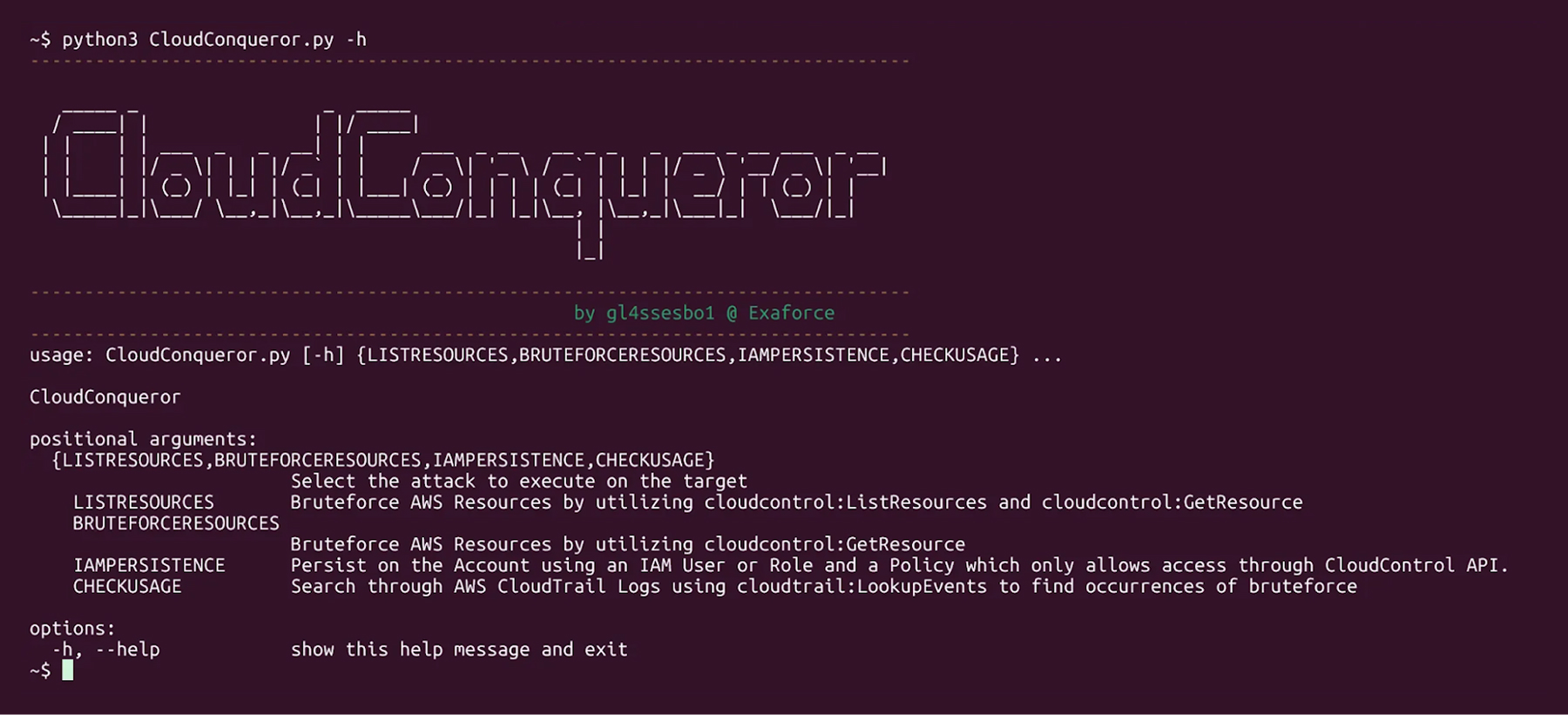
This research culminated with the open source tool called[ CloudConqueror](https://github.com/ExaForce/CloudConqueror), a four part tool, which provides a simulation of all the techniques specified in this research.

* **Resource Listing** by utilizing `cloudcontrol:ListResources` and `cloudcontrol:GetResource`
* **Resource Name Bruteforce** by utilizing `cloudcontrol:GetResource`
* **Persistence by creating an IAM User or Role** with an inline policy that only allows access through CloudControl
* **Listing of CloudControl** events on the account

<figure><img src="https://cdn.prod.website-files.com/67e6900e4370de1b108ab81b/68e45122c34a1144f8275c40_Exaforce-Blog-Do_You_Feel_In_Control_18.jpg" alt="Terminal showing CloudConqueror help output with available attack modules."><figcaption><p><em>Preview of the CloudConquerer tool</em></p></figcaption></figure>

CloudConquerer is built on Python, and [installation is straightforward](https://github.com/ExaForce/CloudConqueror?tab=readme-ov-file#installation), either locally or leveraging Docker. See the repository to try it for yourself.

#### Installing the tool

**Local Installation**

CloudConqueror is built in Python 3, and a file containing the required libraries (requirements.txt) is found inside the main folder of the tool. To install the tool locally, either using a Virtual Environment (python-venv) or installing the libraries on the system directly, the only installation needed is to install the libraries inside requirements.txt.

```javascript
(venv) ~$ python3 -m pip install -r requirements.txt
Requirement already satisfied: boto3 in ./venv/lib/python3.12/site-packages (from -r requirements.txt (line 1)) (1.40.5)
Requirement already satisfied: termcolor in ./venv/lib/python3.12/site-packages (from -r requirements.txt (line 2)) (3.1.0)
Requirement already satisfied: botocore in ./venv/lib/python3.12/site-packages (from -r requirements.txt (line 3)) (1.40.5)
Requirement already satisfied: tabulate in ./venv/lib/python3.12/site-packages (from -r requirements.txt (line 4)) (0.9.0)
Requirement already satisfied: prettytable in ./venv/lib/python3.12/site-packages (from -r requirements.txt (line 5)) (3.16.0)
Requirement already satisfied: jmespath<2.0.0,>=0.7.1 in ./venv/lib/python3.12/site-packages (from boto3->-r requirements.txt (line 1)) (1.0.1)
Requirement already satisfied: s3transfer<0.14.0,>=0.13.0 in ./venv/lib/python3.12/site-packages (from boto3->-r requirements.txt (line 1)) (0.13.1)
Requirement already satisfied: python-dateutil<3.0.0,>=2.1 in ./venv/lib/python3.12/site-packages (from botocore->-r requirements.txt (line 3)) (2.9.0.post0)
Requirement already satisfied: urllib3!=2.2.0,<3,>=1.25.4 in ./venv/lib/python3.12/site-packages (from botocore->-r requirements.txt (line 3)) (2.5.0)
Requirement already satisfied: wcwidth in ./venv/lib/python3.12/site-packages (from prettytable->-r requirements.txt (line 5)) (0.2.13)
Requirement already satisfied: six>=1.5 in ./venv/lib/python3.12/site-packages (from python-dateutil<3.0.0,>=2.1->botocore->-r requirements.txt (line 3)) (1.17.0)
```

Then, the tool can be executed using Python:

```javascript
(venv) ~$ python3 CloudConqueror.py -h
---------------------------------------------------------------------------------

   _____ _                 _  _____
  / ____| |               | |/ ____|
 | |    | | ___  _   _  __| | |     ___  _ __   __ _ _   _  ___ _ __ ___  _ __
 | |    | |/ _ \\| | | |/ _` | |    / _ \\| '_ \\ / _` | | | |/ _ \\ '__/ _ \\| '__|
 | |____| | (_) | |_| | (_| | |___| (_) | | | | (_| | |_| |  __/ | | (_) | |
  \\_____|_|\\___/ \\__,_|\\__,_|\\_____\\___/|_| |_|\\__, |\\__,_|\\___|_|  \\___/|_|
                                                  | |
                                                  |_|

---------------------------------------------------------------------------------
                                                  by gl4ssesbo1 @ Exaforce
---------------------------------------------------------------------------------
usage: CloudConqueror.py [-h] {LISTRESOURCES,BRUTEFORCERESOURCES,IAMPERSISTENCE,CHECKUSAGE} ...

CloudConqueror

positional arguments:
  {LISTRESOURCES,BRUTEFORCERESOURCES,IAMPERSISTENCE,CHECKUSAGE}
                        Select the attack to execute on the target
    LISTRESOURCES       Bruteforce AWS Resources by utilizing cloudcontrol:ListResources and cloudcontrol:GetResource
    BRUTEFORCERESOURCES
                        Bruteforce AWS Resources by utilizing cloudcontrol:GetResource
    IAMPERSISTENCE      Persist on the Account using an IAM User or Role and a Policy which only allows access through CloudControl API.
    CHECKUSAGE          Search through AWS CloudTrail Logs using cloudtrail:LookupEvents to find occurrences of bruteforce

options:
  -h, --help            show this help message and exit
```

#### **Docker Installation**

CloudConqueror contains a Dockerfile; using it, a Docker image can be created, and the tool can be executed from there. To install the Docker image, just run docker build in the directory of the tool.

```javascript
~$ docker build -t cloudconqueror .
Sending build context to Docker daemon  99.07MB
Step 1/7 : FROM python:3.10
3.10: Pulling from library/python
80b7316254b3: Pull complete
36e4db86de6e: Pull complete
8ea45766c644: Pull complete
3cb1455cf185: Pull complete
013acb959c95: Pull complete
ee334269ae4f: Pull complete
3eca4263ed42: Pull complete
Digest: sha256:4585309097d523698d382a2de388340896e021319b327e2d9c028f3b4c316138
Status: Downloaded newer image for python:3.10
 ---> d565b0a5e178
Step 2/7 : WORKDIR /cloudconqueror
 ---> Running in e2e79b4829a4
 ---> Removed intermediate container e2e79b4829a4
 ---> 6f7ef917c82b
Step 3/7 : COPY . .

--snip--

Successfully built 559c27b10eae
Successfully tagged cloudconqueror:latest
```

Then, to execute the tool, simply run the container using docker run. It is recommended to mount the local AWS Profile Directory (\~/.aws directory) so the tool can retrieve the stored awscli sessions and the folder output from the tool’s base directory.

```javascript
~$ docker run -v ~/.aws:/root/.aws -v ./output:/cloudconqueor/output -it cloudconqueror -h
---------------------------------------------------------------------------------

   _____ _                 _  _____
  / ____| |               | |/ ____|
 | |    | | ___  _   _  __| | |     ___  _ __   __ _ _   _  ___ _ __ ___  _ __
 | |    | |/ _ \\| | | |/ _` | |    / _ \\| '_ \\ / _` | | | |/ _ \\ '__/ _ \\| '__|
 | |____| | (_) | |_| | (_| | |___| (_) | | | | (_| | |_| |  __/ | | (_) | |
  \\_____|_|\\___/ \\__,_|\\__,_|\\_____\\___/|_| |_|\\__, |\\__,_|\\___|_|  \\___/|_|
                                                  | |
                                                  |_|

---------------------------------------------------------------------------------
                                                  by gl4ssesbo1 @ Exaforce
---------------------------------------------------------------------------------
usage: CloudConqueror.py [-h] {LISTRESOURCES,BRUTEFORCERESOURCES,IAMPERSISTENCE,CHECKUSAGE} ...

CloudConqueror

positional arguments:
  {LISTRESOURCES,BRUTEFORCERESOURCES,IAMPERSISTENCE,CHECKUSAGE}
                        Select the attack to execute on the target
    LISTRESOURCES       Bruteforce AWS Resources by utilizing cloudcontrol:ListResources and cloudcontrol:GetResource
    BRUTEFORCERESOURCES
                        Bruteforce AWS Resources by utilizing cloudcontrol:GetResource
    IAMPERSISTENCE      Persist on the Account using an IAM User or Role and a Policy which only allows access through CloudControl API.
    CHECKUSAGE          Search through AWS CloudTrail Logs using cloudtrail:LookupEvents to find occurrences of bruteforce

options:
  -h, --help            show this help message and exit
```

### Listing Resources <a href="#listing-resources" id="listing-resources"></a>

CloudConqueror uses `cloudcontrol:ListResources` to list resources of a specific resource type on the account. After listing the resources and getting their identifier, it will attempt to run `cloudcontrol:GetResource` for each of them, to get their properties. The only inputs the tool needs are an AWS stored profile in the `awscli` directory and the type of resource to list.

<figure><img src="https://cdn.prod.website-files.com/67e6900e4370de1b108ab81b/68e452f821d86eece591c29d_Exaforce-Blog-Do_You_Feel_In_Control_19.jpg" alt="CloudConqueror script lists 44 IAM roles from AWS account using CloudControl API"><figcaption><p><em>Using CloudConquerer to list resources</em></p></figcaption></figure>

All resource types are listed as choices on the tool’s `--resource-type` flag, which filters out resources not managed by the AWS CloudControl API.

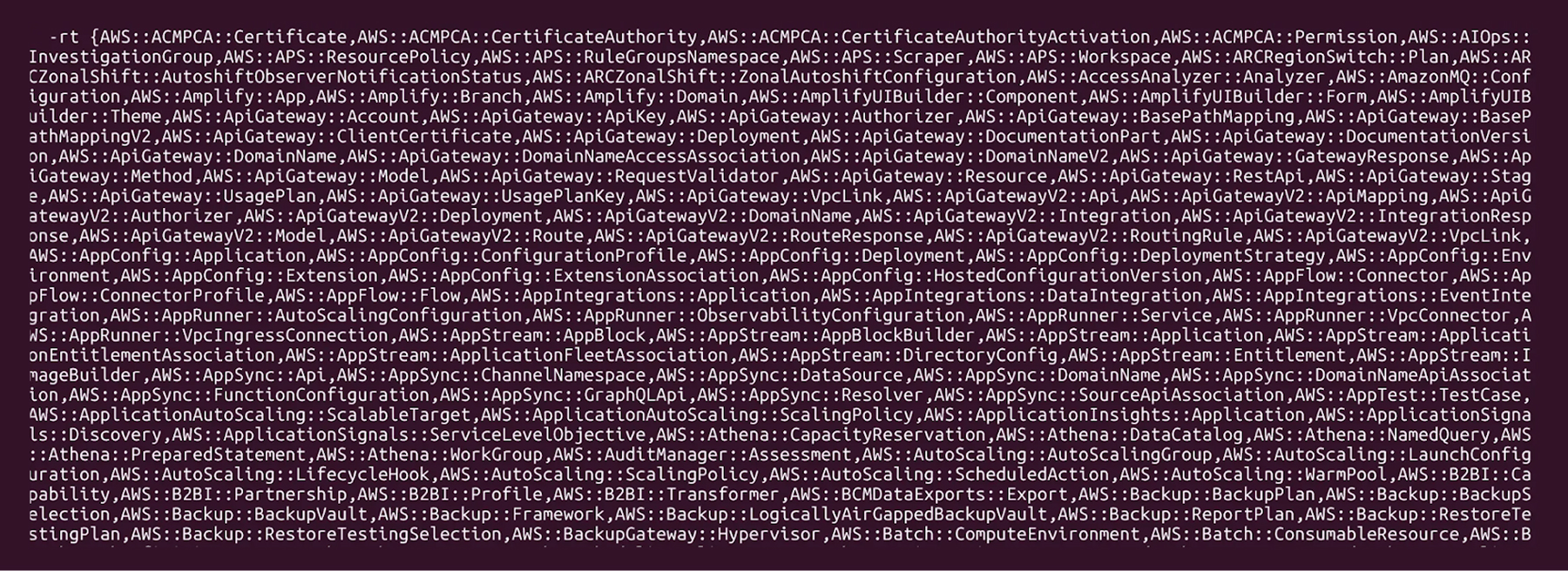
<figure><img src="https://cdn.prod.website-files.com/67e6900e4370de1b108ab81b/68e453035293ebb7b98a5ecd_Exaforce-Blog-Do_You_Feel_In_Control_20.jpg" alt="Terminal showing extensive list of AWS service types parsed by CloudConqueror"><figcaption><p><em>Output of the resource type call</em></p></figcaption></figure>

### Brute forcing Resources <a href="#brute-forcing-resources" id="brute-forcing-resources"></a>

One of the techniques discussed in this article was using the `cloudcontrol:GetResource` API call on a list of potential resource names to find if one of them exists. So basically, an authenticated name fuzzing of resources on the account.

The `BRUTEFORCE` command requires the attacker to provide an AWS profile, the resource type, an AWS region, and a list of resource names, and go through each of them, running `cloudcontrol:GetResource`, which returns resources with their properties.

<figure><img src="https://cdn.prod.website-files.com/67e6900e4370de1b108ab81b/68e4532c67540d9473266402_Exaforce-Blog-Do_You_Feel_In_Control_21.jpg" alt="CloudConqueror finds IAM user with CloudTrail update access using brute force test"><figcaption><p><em>CloudControl brute force looking for existing resources</em></p></figcaption></figure>

#### Persisting in an AWS Account

An attacker can create an IAM policy that only allows access through the CloudControl API and then attaches it to an IAM user, group, or role, to persist using them as mentioned in the section “How effective can AWS CloudControl API be as an attack tool”.

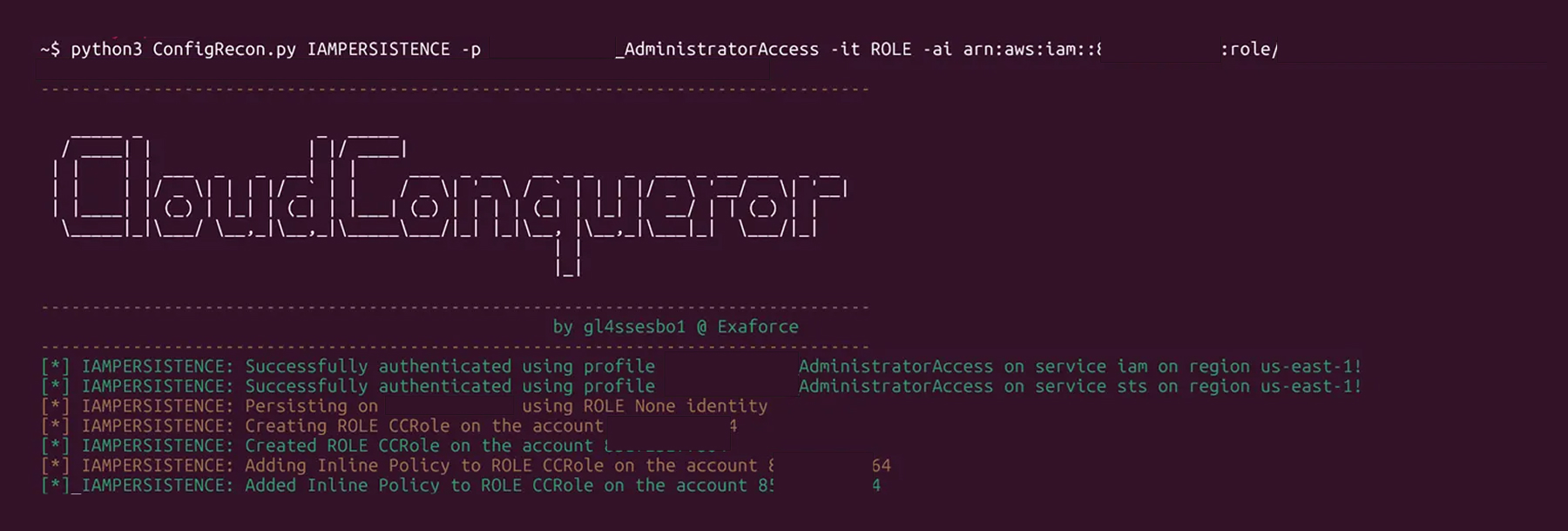
CloudConqueror’s `IAMPERSISTENCE` command will use that technique to create a user or a role (by default named CCUser or CCRole if not defined by the attacker) and assign an Inline Policy called CCInlinePolicy on them with a Policy Definition same as the one on the section “How effective can AWS CloudControl API be as an attack tool”.

<figure><img src="https://cdn.prod.website-files.com/67e6900e4370de1b108ab81b/68e453517b7775c200391c7f_Exaforce-Blog-Do_You_Feel_In_Control_22.jpg" alt="CloudConqueror creates new IAM role and inline policy for persistence testing"><figcaption><p><em>CloudConquerer command to create a policy to persist in an account</em></p></figcaption></figure>

#### Finding occurrences of CloudControl abuse

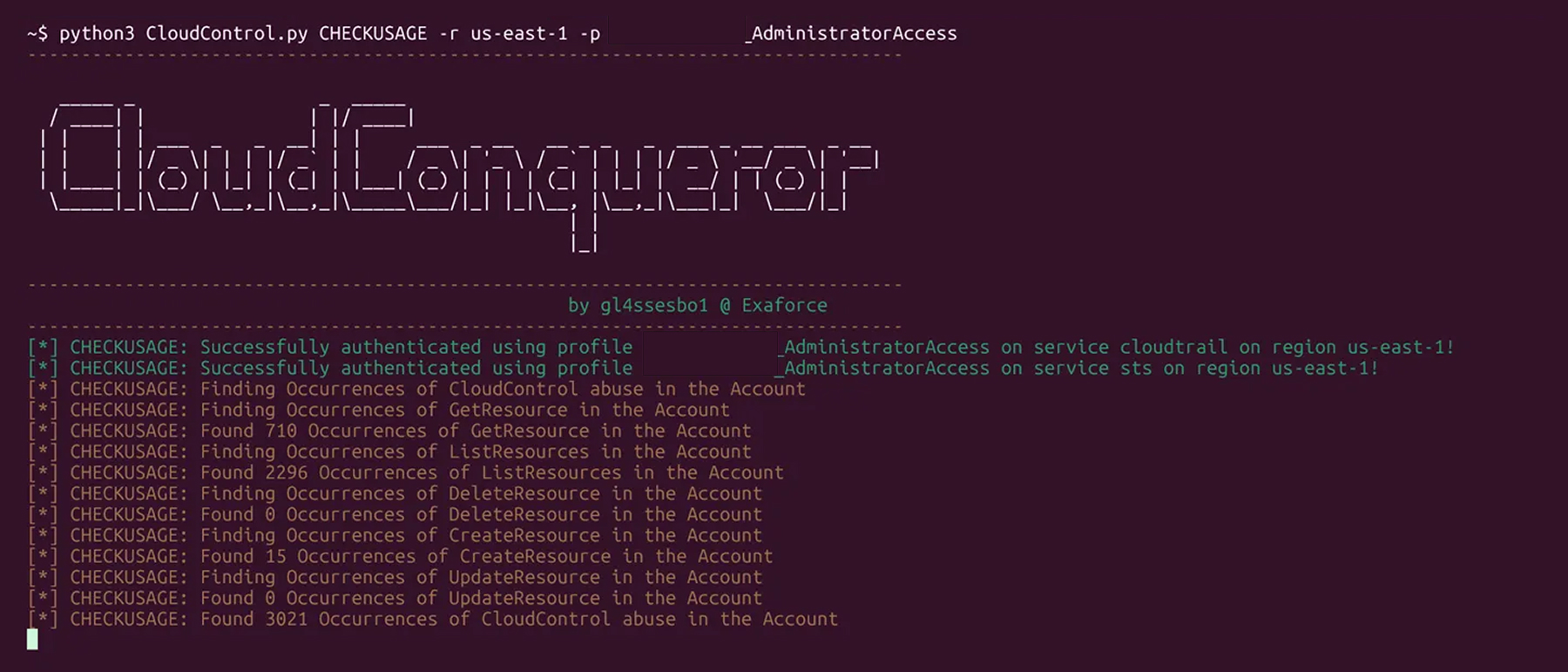
Lastly, CloudConqueror can help with one step of detection. The tool’s `CHECKUSAGE` command uses `cloudtrail:LookupEvents` to search for the execution of the CloudControl API on the account and output a table and CSV out of them.

<figure><img src="https://cdn.prod.website-files.com/67e6900e4370de1b108ab81b/68e4536de62f7f41ed5f60f6_Exaforce-Blog-Do_You_Feel_In_Control_23.jpg" alt="CloudConqueror detects thousands of CloudControl API abuses across account"><figcaption><p><em>CloudConquerer checking for the execution of CloudControl API calls</em></p></figcaption></figure>

The output CSV will be stored in the directory path output/\<Account ID>/cloudcontrol-events.csv in the tool’s directory.

<figure><img src="https://cdn.prod.website-files.com/67e6900e4370de1b108ab81b/68e453918d2433890c38c732_Exaforce-Blog-Do_You_Feel_In_Control_24.jpg" alt="Output file cloudcontrol-events.csv successfully created by CloudConqueror"><figcaption><p><em>Creation of a CSV with CloudControl API calls</em></p></figcaption></figure>

### Keeping CloudControl in check <a href="#keeping-cloudcontrol-in-check" id="keeping-cloudcontrol-in-check"></a>

AWS CloudControl API is a powerful feature that enables AWS users to have a clean, easy way of managing and utilizing the overwhelming amount of API calls AWS API has. But, as it often goes, when something is easy for the user to use, it is also easy for an attacker to abuse.

Utilizing AWS CloudControl API as an attack tool, while having limitations, can be a very good way of breaking detection chains, which can lead to an attacker potentially blending in while doing mischievous tasks on the account. As such, it is a feature worth keeping an eye on and making sure no unwanted entity is using it maliciously.