> For the complete documentation index, see [llms.txt](https://blog.pepperclipp.com/pepperclipp-public/llms.txt). Markdown versions of documentation pages are available by appending `.md` to page URLs; this page is available as [Markdown](https://blog.pepperclipp.com/pepperclipp-public/aws/an-arrow-to-the-heel-abusing-default-machine-joining-to-domain-permissions-to-attack-aws-managed-ad.md).
# An Arrow to the Heel: Abusing Default Machine Joining to Domain Permissions to Attack AWS Managed AD
Article originally posted on Permiso's blog: https\://permiso.io/blog/abusing-default-machine-joining-to-domain-permissions-to-attack-aws-managed-active-directory
## Intro
AWS Managed Active Directory, or the AWS Directory Service, is a service which provides users with an Active Directory environment hosted and managed on AWS infrastructure. However, there are some subtle similarities and differences between on-premise AD and AWS Directory Service. One difference is that AWS Directory Service limits access to the Domain Controllers as well as access to get Domain Admin access, by creating an `Organizational Unit (OU)` on which the user is an Administrator. Yet as an Active Directory environment, it suffers from the same issues and vulnerabilities that on-prem AD environments have, including its default configurations. One of these defaults configurations is the `ms-ds-MachineAccountQuota` attribute.
This blog will give an overview of how this Active Directory default attribute, which cannot be modified by AWS, can lead to the compromise of your own AD environment.
## Resource-Based Constrained Delegation
`Resource-Based Constrained Delegation (RBCD)` is a feature created to limit the abuse of Constrained Delegation, enabling the delegated machine to choose what other machines can delegate on it, thus limiting the attacks if privileges to the delegated machine are limited. However, if an identity has write access on a machine then they can modify the machine’s delegation settings via the `msDS-AllowedToActOnBehalfOfOtherIdentity` attribute and add an attacker-controlled computer account, thus allowing themselves to delegate access as any identity on the domain. This can lead to potential access on a machine as a `Local Administrator` by abusing the privileges of an administrative identity:
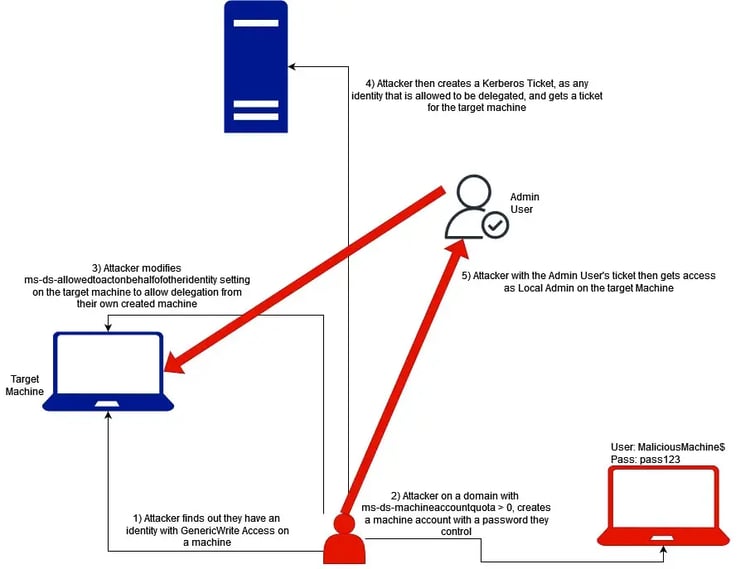 For an identity to have access on a machine, they should be allowed one of the following privileges on the machine object:
* **GenericAll** - full rights to the object
* **GenericWrite** - update object's attributes
* **WriteAccountRestrictions** - modify computer account settings
Some additional rights which can lead to ACL modification to grant the attacker write access on the computer account are:
* **WriteOwner** - change object owner to attacker
* **WriteDACL** - modify object's ACEs and give attacker full control right over the object

If the machine does not have a setting configured for the `msDS-AllowedToActOnBehalfOfOtherIdentity` attribute, an attacker can add it. Otherwise, an attacker can modify it to allow their own machine and then change it back to its prior value.

A ticket is then requested for any service on the target machine as an administrative user (`Admin` in our case) to get access to it. In this example `SMB` is requested, which allows `SMB Share Directory Access` and a remote shell using tools like `PSExec`, but a ticket for any service can be requested (`RDP`, `SMB`, `WSMAN`, `HTTP`, `MSSQL`, or any custom service defined by a `Custom SPN`, as explained in this blog: ).


This same attack technique also works for Windows servers, allowing remote access using RDP, unless the CredSSP patch (`CVE-2018-0886`) is applied. Typically, AWS is prompt in patching official AWS images as soon as security patches are available, but AWS will not apply patches to non-AWS images or directly to EC2 instances. Therefore, any EC2 instances running older or unofficial images without this CredSSP patch applied are potentially still vulnerable to this RDP-focused attack. All new Windows server EC2 instances we deployed during this testing had the CredSSP patch installed.


## Identities Allowed to be Delegated
In order for a delegation attack to work, the target identity must have the property `AccountNotDelegated` set to `False`. If `AccountNotDelegated` is set to `True`, no type of delegation will work, so trying to authenticate as it is on a service will not work by design.
When an AWS Directory Service domain instance is created, AWS creates two identities on the domain, aside from the usual `Administrator`, `krbtgt` and `Guest`. These identities are `Admin` and `AWS_`. The only identity the creator will have access to is`Admin`, which is the administrator of the Organizational Unit provided by AWS. It is the only identity for which the creator can manage and modify the password.
This `Admin` identity is the only identity with the property `AccountNotDelegated` set to `False`, aside from `Guest` and `krbtgt`. `krbtgt` by default cannot be delegated and `Guest` is not important, so `Admin` is the only identity allowed to be delegated.

Therefore, a successful attack will not give the attacker access as Domain Admin, but rather OU Admin access, which is enough to tamper with all the target’s domain resources.
## ms-ds-MachineAccountQuota
Active Directory is an object-based directory, where an administrator can create objects (users, groups, computers, domains, forests, GPO’s, etc.) and manage Access Controls (ACLs) for them. As an object directory, it requires each object to be created and point to the corresponding resource.
As a rule of thumb, only Administrators or a well-defined role (e.g. IT HelpDesk, Security Engineers, etc.) should have access to create or modify resources according to the principle of least privilege. However, by default computers are not part of this rule.
The `ms-ds-MachineAccountQuota` attribute is a value in an AD domain that defines how many computer objects a non-admin can add to the domain. By default, this setting is 10.
For an identity to have access on a machine, they should be allowed one of the following privileges on the machine object:
* **GenericAll** - full rights to the object
* **GenericWrite** - update object's attributes
* **WriteAccountRestrictions** - modify computer account settings
Some additional rights which can lead to ACL modification to grant the attacker write access on the computer account are:
* **WriteOwner** - change object owner to attacker
* **WriteDACL** - modify object's ACEs and give attacker full control right over the object

If the machine does not have a setting configured for the `msDS-AllowedToActOnBehalfOfOtherIdentity` attribute, an attacker can add it. Otherwise, an attacker can modify it to allow their own machine and then change it back to its prior value.

A ticket is then requested for any service on the target machine as an administrative user (`Admin` in our case) to get access to it. In this example `SMB` is requested, which allows `SMB Share Directory Access` and a remote shell using tools like `PSExec`, but a ticket for any service can be requested (`RDP`, `SMB`, `WSMAN`, `HTTP`, `MSSQL`, or any custom service defined by a `Custom SPN`, as explained in this blog: ).


This same attack technique also works for Windows servers, allowing remote access using RDP, unless the CredSSP patch (`CVE-2018-0886`) is applied. Typically, AWS is prompt in patching official AWS images as soon as security patches are available, but AWS will not apply patches to non-AWS images or directly to EC2 instances. Therefore, any EC2 instances running older or unofficial images without this CredSSP patch applied are potentially still vulnerable to this RDP-focused attack. All new Windows server EC2 instances we deployed during this testing had the CredSSP patch installed.


## Identities Allowed to be Delegated
In order for a delegation attack to work, the target identity must have the property `AccountNotDelegated` set to `False`. If `AccountNotDelegated` is set to `True`, no type of delegation will work, so trying to authenticate as it is on a service will not work by design.
When an AWS Directory Service domain instance is created, AWS creates two identities on the domain, aside from the usual `Administrator`, `krbtgt` and `Guest`. These identities are `Admin` and `AWS_`. The only identity the creator will have access to is`Admin`, which is the administrator of the Organizational Unit provided by AWS. It is the only identity for which the creator can manage and modify the password.
This `Admin` identity is the only identity with the property `AccountNotDelegated` set to `False`, aside from `Guest` and `krbtgt`. `krbtgt` by default cannot be delegated and `Guest` is not important, so `Admin` is the only identity allowed to be delegated.

Therefore, a successful attack will not give the attacker access as Domain Admin, but rather OU Admin access, which is enough to tamper with all the target’s domain resources.
## ms-ds-MachineAccountQuota
Active Directory is an object-based directory, where an administrator can create objects (users, groups, computers, domains, forests, GPO’s, etc.) and manage Access Controls (ACLs) for them. As an object directory, it requires each object to be created and point to the corresponding resource.
As a rule of thumb, only Administrators or a well-defined role (e.g. IT HelpDesk, Security Engineers, etc.) should have access to create or modify resources according to the principle of least privilege. However, by default computers are not part of this rule.
The `ms-ds-MachineAccountQuota` attribute is a value in an AD domain that defines how many computer objects a non-admin can add to the domain. By default, this setting is 10.
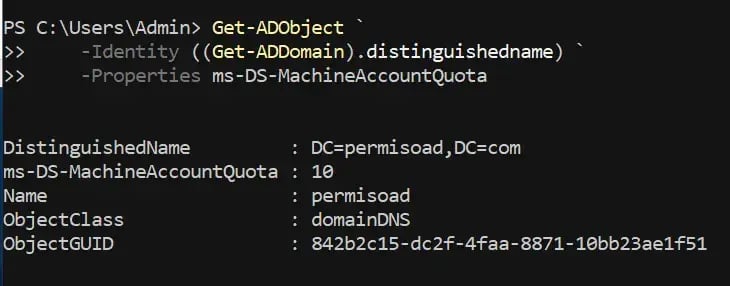 In order to mitigate this scenario in an on-prem AD environment, a role of Domain Admin, Enterprise Admin, or a high-privileged role with WriteAccess to the domain can use dsa.msc or Powershell ActiveDirectoryModule to modify the attribute’s value from 10 to 0. The issue with AWS Managed AD is that the user is not allowed to have Domain Administrative access. The user is only given an Organizational Unit with the name of the domain, and they are admin only on it.

This prevents a user from modifying `ms-ds-MachineAccountQuota` setting, as it is a setting outside of the scope of the Organizational Unit:

In this configuration, the AWS Managed AD environment will be vulnerable to RBCD attacks on the environment, as well as other attacks on non-updated Windows Machines.
Another thing to be considered is that the computer created by the user will be placed on the domain’s `Computers OU`, not the Organizational Unit provided by AWS, thus allowing creation of a domain machine.

## “Add Workstations to the Domain” Group
An Administrator can choose to nullify the effects of `ms-ds-MachineAccountQuota` by only allowing a domain group to join machines on the domain using a Group Policy Object (GPO). Below is a thread of discussions on this topic.
AWS Directory Service seems to do this by having a group called`AWS Delegated Add Workstations to the Domain,`another name for `Add Workstations to the Domain` continuing the trend of simply prepending “AWS Delegated” to the original group name. This group does use this setting but allows all `Domain Users` access to it, completely nullifying the reason why the configuration exists.
In order to mitigate this scenario in an on-prem AD environment, a role of Domain Admin, Enterprise Admin, or a high-privileged role with WriteAccess to the domain can use dsa.msc or Powershell ActiveDirectoryModule to modify the attribute’s value from 10 to 0. The issue with AWS Managed AD is that the user is not allowed to have Domain Administrative access. The user is only given an Organizational Unit with the name of the domain, and they are admin only on it.

This prevents a user from modifying `ms-ds-MachineAccountQuota` setting, as it is a setting outside of the scope of the Organizational Unit:

In this configuration, the AWS Managed AD environment will be vulnerable to RBCD attacks on the environment, as well as other attacks on non-updated Windows Machines.
Another thing to be considered is that the computer created by the user will be placed on the domain’s `Computers OU`, not the Organizational Unit provided by AWS, thus allowing creation of a domain machine.

## “Add Workstations to the Domain” Group
An Administrator can choose to nullify the effects of `ms-ds-MachineAccountQuota` by only allowing a domain group to join machines on the domain using a Group Policy Object (GPO). Below is a thread of discussions on this topic.
AWS Directory Service seems to do this by having a group called`AWS Delegated Add Workstations to the Domain,`another name for `Add Workstations to the Domain` continuing the trend of simply prepending “AWS Delegated” to the original group name. This group does use this setting but allows all `Domain Users` access to it, completely nullifying the reason why the configuration exists.
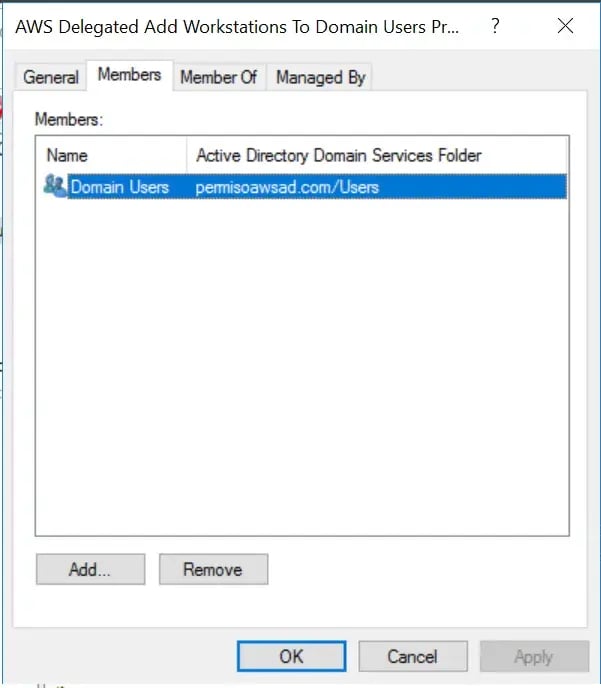 This means a non-privileged user with default group membership (as seen below, the user is part of `AWS Delegated Add Workstations to the Domain` by default) can create and join a machine account directly to the domain, not just on the Organizational Unit provided by AWS Directory Service. And the value of the `ms-ds-MachineAccountQuota` attribute will not affect this capability.


Further validation demonstrates this particular setting is affecting the machine account creation. For example, when the `Domain Users` group is removed from the `AWS Delegated Add Workstations to the Domain` group, the machine account creation will fail when attempted with a low-privileged domain user – even when `ms-ds-MachineAccountQuota` is larger than zero.


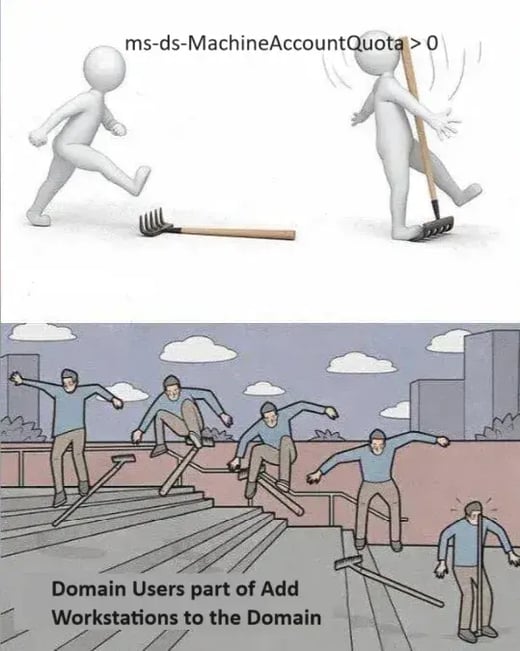
At this point, we are back to square one, with unprivileged domain users being able to create a machine account using a default, non-configurable setting in AWS Managed Active Directory.
This means a non-privileged user with default group membership (as seen below, the user is part of `AWS Delegated Add Workstations to the Domain` by default) can create and join a machine account directly to the domain, not just on the Organizational Unit provided by AWS Directory Service. And the value of the `ms-ds-MachineAccountQuota` attribute will not affect this capability.


Further validation demonstrates this particular setting is affecting the machine account creation. For example, when the `Domain Users` group is removed from the `AWS Delegated Add Workstations to the Domain` group, the machine account creation will fail when attempted with a low-privileged domain user – even when `ms-ds-MachineAccountQuota` is larger than zero.


At this point, we are back to square one, with unprivileged domain users being able to create a machine account using a default, non-configurable setting in AWS Managed Active Directory.
 ## Using the API to Create a Machine
While searching for alternative machine creation methods, Permiso identified an AWS API called `directoryservice:CreateComputer` which creates a computer object on the domain. This is particularly interesting, because if a machine is created using a non-administrative account, it means this is the reason `ms-ds-MachineAccountQuota` is larger than zero. If a machine is created using administrative privileges and `ms-ds-MachineAccountQuota` is not needed, RBCD will be allowed for anybody with access to a domain machine and access to execute `directoryservice:CreateComputer`.

The machine in this case will be created on the Directory Service’s Organizational Unit instead of the domain.

At this point, we need to conclude whether the machine was created by a non-administrative domain account or an administrative account to prove the value of `ms-ds-MachineAccountQuota` or the membership of `AWS Delegated Add Workstations to the Domain` group will affect the API during the creation of the machine.
## Abusing Instance Profile Default Privileges
Another common avenue for the addition of machines into AWS Managed Active Directory is during the creation of EC2 instances. When an EC2 Instance is launched, the creator can choose to automatically join the instance to a `DirectoryService` domain. In order to do that, the machine needs to have 2 roles attached:
* `AmazonSSMDirectoryServiceAccess`
* `AmazonSSMManagedInstanceCore`
The role `AmazonSSMDirectoryServiceAccess`allows 2 privileges:
* `ds:CreateComputer`
* `ds:DescribeDirectories`
These privileges are allowed on all resources, meaning the Instance Profile will be able to create any `Domain Machine` and list any `Directory Service`. Even more alarming is that the instance profile will be able to create machines on other `DirectoryService` domains.
```
{
"Version": "2012-10-17",
"Statement": [
{
"Effect": "Allow",
"Action": [
"ds:CreateComputer",
"ds:DescribeDirectories"
],
"Resource": "*"
}
]
}
```
Another AWS managed policy to be wary of is `AmazonEC2RoleforSSM`. Permiso has [written a blog](https://permiso.io/blog/s/deprecated-aws-policy-amazonec2roleforssm/) about the issues with this policy before, and one of the privileges that the policy grants is access to `DirectoryServices`, more specifically, `ds:CreateComputer` and `ds:DescribeDirectories` on any AWS Directory Service instance.
The offensive implications are as follows: if an attacker gains access to an instance inside a domain with either `AmazonSSMDirectoryServiceAccess` or `AmazonEC2RoleforSSM` policy attached, or any other policy that allows `ds:CreateComputer` (and hopefully `ds:DescribeDirectories` or a way to find the directory name), the attacker will be able to create a machine account and escalate to perform an RBCD attack, even with the modified membership of the `AWS Delegated Add Workstations to the Domain` group.
## Detecting Machine Creation using API
Detecting machine creation in an on-prem AD environment involves searching through the Domain Controller’s Windows event logs for Event ID `4741` (`Computer Account was created`), which reveals the identity that created the machine. However, in AWS Managed Activity Directory, the user is not granted access to the Domain Controller; rather, AWS Directory Services stores the same event in CloudWatch.
When a machine is created using the API call`directoryservice:CreateComputer`, the identity creating the machine account will be the Domain Controller machine account (in our case `IP-C613015D$`). The dollar sign ($) at the end of the domain machine name indicates the name of the machine account user of the Domain Controller.

On the other hand, when the machine is created by a domain user, the account name will be the username of the domain user, in our case `Admin`:

Permiso recommends alerting on any case of a machine being created and added to a domain by a non-Domain Controller identity or a non-Domain Admin identity.
## AWS Response
On `January 31, 2025`Permiso reported the bug to AWS. After several discussions about the attack and its impact, on `March 13th, 2025`, AWS responded that the report will not be considered an issue, falling into their exclusion of `"Non-default configuration or changes made using valid credentials that were correctly authorized"` due to configuration changes being:
1. Made using valid credentials
2. Limited to join workstations using valid credentials to a count of 10
3. Managing the group membership of a customer's AWS Managed AD is on the customer side of the Shared Responsibility Model ()
## Recommendations
Permiso recommends that organizations change the group membership of `AWS Delegated Add Workstations to the Domain` from `Domain Users` to `AWSAdministrators`, which will still allow admins to attach machines on the domain, but not unprivileged users.


Modifying the group membership will not affect the AWS API from creating computer accounts. Due to the AWS API executing the command using the Domain Controller Machine Account, the AWS API will not be affected by any of the Domain Group Membership Privileges. That means, even if `“AWS Delegated Add Workstations to the Domain”` does not have any members altogether, the Domain Controller Machine Account will not affect the AWS API.

We also recommend monitoring CloudWatch DirectoryService events to detect possible machine account creation (`EventID 4741`).
## Conclusions
Resource-Based Constrained Delegation (RBCD) attacks are not new. Even the `ms-ds-MachineAccountQuota` attribute’s default value is well-documented and understood as an attack avenue with clear recommendations to mitigate this attack path.
What IS new are the subtle implications of using the “same” on-prem AD environment hosted by AWS. Specifically, AWS Managed Active Directory (also known as AWS Directory Services) denies the user the ability to access the managed Domain Controller or modify the `ms-ds-MachineAccountQuota` attribute.
In this blog, we have highlighted our research into several scenarios in which this limitation can be exploited to enable a non-privileged identity to create a machine on a domain and ultimately escalate and perform a Resource-Based Constrained Delegation (RBCD) attack. We outlined partial mitigation strategies, though we highly encourage each organization to perform additional monitoring since AWS has stated they will not update the default attribute setting, nor will they allow users to update it.
## Using the API to Create a Machine
While searching for alternative machine creation methods, Permiso identified an AWS API called `directoryservice:CreateComputer` which creates a computer object on the domain. This is particularly interesting, because if a machine is created using a non-administrative account, it means this is the reason `ms-ds-MachineAccountQuota` is larger than zero. If a machine is created using administrative privileges and `ms-ds-MachineAccountQuota` is not needed, RBCD will be allowed for anybody with access to a domain machine and access to execute `directoryservice:CreateComputer`.

The machine in this case will be created on the Directory Service’s Organizational Unit instead of the domain.

At this point, we need to conclude whether the machine was created by a non-administrative domain account or an administrative account to prove the value of `ms-ds-MachineAccountQuota` or the membership of `AWS Delegated Add Workstations to the Domain` group will affect the API during the creation of the machine.
## Abusing Instance Profile Default Privileges
Another common avenue for the addition of machines into AWS Managed Active Directory is during the creation of EC2 instances. When an EC2 Instance is launched, the creator can choose to automatically join the instance to a `DirectoryService` domain. In order to do that, the machine needs to have 2 roles attached:
* `AmazonSSMDirectoryServiceAccess`
* `AmazonSSMManagedInstanceCore`
The role `AmazonSSMDirectoryServiceAccess`allows 2 privileges:
* `ds:CreateComputer`
* `ds:DescribeDirectories`
These privileges are allowed on all resources, meaning the Instance Profile will be able to create any `Domain Machine` and list any `Directory Service`. Even more alarming is that the instance profile will be able to create machines on other `DirectoryService` domains.
```
{
"Version": "2012-10-17",
"Statement": [
{
"Effect": "Allow",
"Action": [
"ds:CreateComputer",
"ds:DescribeDirectories"
],
"Resource": "*"
}
]
}
```
Another AWS managed policy to be wary of is `AmazonEC2RoleforSSM`. Permiso has [written a blog](https://permiso.io/blog/s/deprecated-aws-policy-amazonec2roleforssm/) about the issues with this policy before, and one of the privileges that the policy grants is access to `DirectoryServices`, more specifically, `ds:CreateComputer` and `ds:DescribeDirectories` on any AWS Directory Service instance.
The offensive implications are as follows: if an attacker gains access to an instance inside a domain with either `AmazonSSMDirectoryServiceAccess` or `AmazonEC2RoleforSSM` policy attached, or any other policy that allows `ds:CreateComputer` (and hopefully `ds:DescribeDirectories` or a way to find the directory name), the attacker will be able to create a machine account and escalate to perform an RBCD attack, even with the modified membership of the `AWS Delegated Add Workstations to the Domain` group.
## Detecting Machine Creation using API
Detecting machine creation in an on-prem AD environment involves searching through the Domain Controller’s Windows event logs for Event ID `4741` (`Computer Account was created`), which reveals the identity that created the machine. However, in AWS Managed Activity Directory, the user is not granted access to the Domain Controller; rather, AWS Directory Services stores the same event in CloudWatch.
When a machine is created using the API call`directoryservice:CreateComputer`, the identity creating the machine account will be the Domain Controller machine account (in our case `IP-C613015D$`). The dollar sign ($) at the end of the domain machine name indicates the name of the machine account user of the Domain Controller.

On the other hand, when the machine is created by a domain user, the account name will be the username of the domain user, in our case `Admin`:

Permiso recommends alerting on any case of a machine being created and added to a domain by a non-Domain Controller identity or a non-Domain Admin identity.
## AWS Response
On `January 31, 2025`Permiso reported the bug to AWS. After several discussions about the attack and its impact, on `March 13th, 2025`, AWS responded that the report will not be considered an issue, falling into their exclusion of `"Non-default configuration or changes made using valid credentials that were correctly authorized"` due to configuration changes being:
1. Made using valid credentials
2. Limited to join workstations using valid credentials to a count of 10
3. Managing the group membership of a customer's AWS Managed AD is on the customer side of the Shared Responsibility Model ()
## Recommendations
Permiso recommends that organizations change the group membership of `AWS Delegated Add Workstations to the Domain` from `Domain Users` to `AWSAdministrators`, which will still allow admins to attach machines on the domain, but not unprivileged users.


Modifying the group membership will not affect the AWS API from creating computer accounts. Due to the AWS API executing the command using the Domain Controller Machine Account, the AWS API will not be affected by any of the Domain Group Membership Privileges. That means, even if `“AWS Delegated Add Workstations to the Domain”` does not have any members altogether, the Domain Controller Machine Account will not affect the AWS API.

We also recommend monitoring CloudWatch DirectoryService events to detect possible machine account creation (`EventID 4741`).
## Conclusions
Resource-Based Constrained Delegation (RBCD) attacks are not new. Even the `ms-ds-MachineAccountQuota` attribute’s default value is well-documented and understood as an attack avenue with clear recommendations to mitigate this attack path.
What IS new are the subtle implications of using the “same” on-prem AD environment hosted by AWS. Specifically, AWS Managed Active Directory (also known as AWS Directory Services) denies the user the ability to access the managed Domain Controller or modify the `ms-ds-MachineAccountQuota` attribute.
In this blog, we have highlighted our research into several scenarios in which this limitation can be exploited to enable a non-privileged identity to create a machine on a domain and ultimately escalate and perform a Resource-Based Constrained Delegation (RBCD) attack. We outlined partial mitigation strategies, though we highly encourage each organization to perform additional monitoring since AWS has stated they will not update the default attribute setting, nor will they allow users to update it.